
 Deutsch
 Dansk
 Suomi
 Latviešu
 Lietuvių
 Norsk bokmål
 polski
 Русский
 Svenska

No products in the cart.
Uncategorized
Best Huawei Smart Charger Substitute: V2C Trydan
06
Nov
Nov
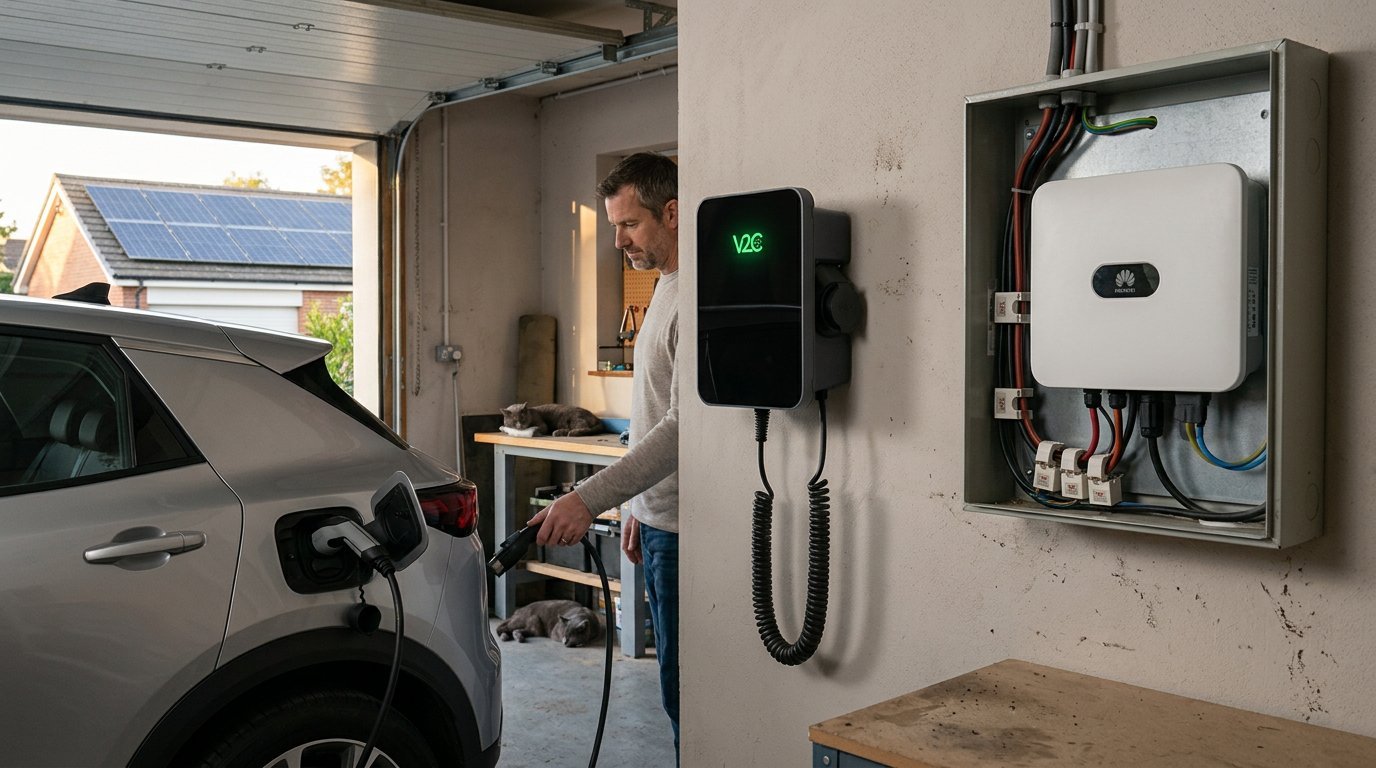
V2C Trydan is a 22 kW substitute for a Huawei smart charger and is compatible with Huawei inverters for dynamic power control or solar balancing via local WIFI! If you want your charger to work with your inverter, compatibility is the key decision, not just the charger’s power rating.
You’ll learn how to configure dynamic power control in V2C Cloud and what the Huawei inverter connection involves. The setup depends on the communication method and the equipment already installed, so understanding those details helps you choose the right configuration.
We’ll explain how Trydan communicates with a Huawei inverter, how to approach dynamic or solar balancing, and what to consider before changing settings. You’ll also see where a Huawei meter fits into the connection and how to identify the inverter’s local network address. Follow the steps to make a more informed charger choice and understand the configuration process before you begin.
Key Takeaways
- Learn which Huawei inverter connection details matter when pairing it with an EV charger.
- See how household loads and available solar power affect dynamic charging decisions.
- Understand what to configure in V2C Cloud to manage dynamic power control.
- Explore what to consider when choosing a Huawei-compatible alternative, including the V2C Trydan 22kW.
Huawei inverter and Trydan compatibility
V2C Trydan is compatible with Huawei inverters for dynamic power control or solar balancing. You can set it up by connecting both Huawei Inverter and Trydan to local Wifi. Then follow simple setup steps on V2C App to setup DLM via Huawei inverter. Use these steps to identify the connection details and charging mode your setup needs.
Compare Huawei-Compatible Solar Charging Alternatives
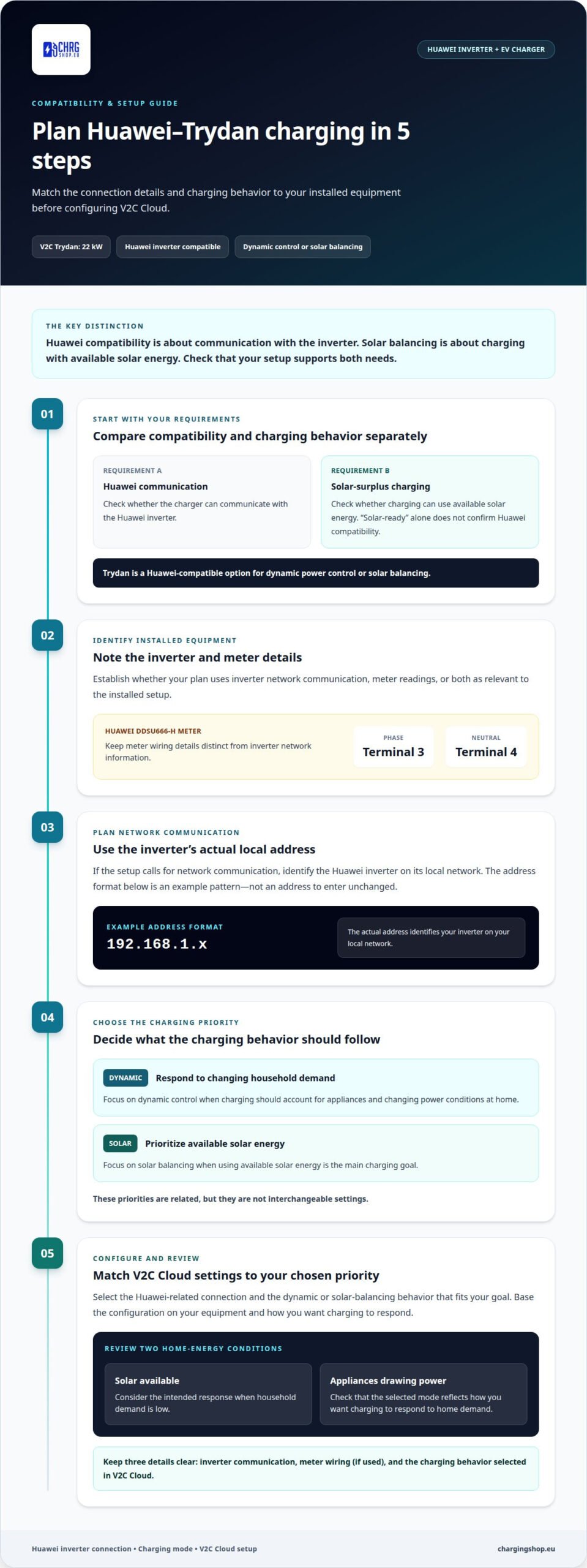
Start by comparing chargers that support both Huawei inverter communication and solar-surplus charging. Trydan is a Huawei-compatible option for dynamic or solar balancing. Match the charger’s power-control method to the equipment already installed, rather than choosing by charging power alone.Treat inverter compatibility and solar-surplus charging as separate requirements. Compatibility concerns communication with Huawei equipment; solar balancing concerns how charging uses available solar energy. Check that your setup supports both. A charger described as solar-ready is not necessarily compatible with a Huawei inverter.
- Identify the Huawei equipment involved before planning the connection. For example, the Huawei DDSU666-H meter uses terminal 3 for the phase and terminal 4 for the neutral. Those terminal details help distinguish the meter connection from inverter network communication. Keep the meter model and connection method clear in your configuration plan.Use the inverter’s local network address when the setup calls for network communication. A Huawei inverter address may follow the format 192.168.1.x. That format is an example, not a complete address to enter unchanged. The actual address identifies the inverter on its local network.
Assess Dynamic Balancing with Huawei and Household Loads
Choose dynamic balancing when charging needs to respond to household demand as well as inverter output. Trydan’s Huawei compatibility supports dynamic power control or solar balancing. The relevant setup should use the Huawei system’s measurements to guide charging, so the available power changes with the home’s energy use.Keep the two aims distinct: dynamic balancing responds to changing power conditions, while solar balancing focuses on available solar energy. Decide which behavior suits your charging priorities before configuring V2C Cloud. Avoid treating surplus-only charging and household-load balancing as interchangeable settings.
- Prepare the configuration details in a clear sequence: identify the Huawei inverter, note whether a DDSU666-H meter is used, and determine whether communication uses the local network. Then select the intended balancing behavior in V2C Cloud. The inverter address format 192.168.1.x can help you recognize a local-network entry.Keep meter wiring information separate from network details. For a DDSU666-H, phase connects to terminal 3 and neutral to terminal 4. This distinction makes the Huawei-to-Trydan compatibility plan easier to follow and reduces confusion between electrical connections and software configuration.
Can V2C Trydan dynamically balance charging with a Huawei inverter and household loads?
Yes. V2C Trydan supports dynamic power control or solar balancing with Huawei inverters. Use these steps to match its charging behavior to your home’s energy priorities.
- Decide what matters most. Dynamic power control responds to changing household demand, while solar balancing prioritizes available solar energy. If you want charging to account for appliances in use at home, focus on dynamic control. If using solar surplus is your main goal, prioritize solar balancing.V2C Trydan is a 22 kW Huawei smart charger substitute compatible with Huawei inverters for dynamic or solar balancing. The suitable mode depends on which energy behavior you want the charger to follow.
- Check how the Huawei system will communicate with the charger. The connection method determines which power information can guide charging. Keep inverter communication distinct from meter-based measurements, since these are different ways to provide energy data.For example, a network connection uses the inverter’s local communication details, while a meter-based setup relies on meter readings. Plan around the equipment already installed in your Huawei system.
- Configure the intended behavior in V2C Cloud. Select the Huawei-related connection and the dynamic or solar-balancing mode that matches your priority. A 22 kW Huawei smart charger substitute such as V2C Trydan is compatible with Huawei inverters for dynamic or solar balancing, but the selected control behavior still needs to match your goal.Choose settings based on how you want charging to respond, not on a label alone. Consider household demand, solar availability, and the specific priority your setup needs to follow. Here is setup instruction.
- Review the configuration against different home-energy conditions. Consider one situation with solar energy available and household demand low, then another with appliances drawing power. Check that the selected V2C Cloud mode reflects the intended response.If you want help shaping the setup around your requirements, explore personalised charging options. A clearly defined priority helps guide the configuration.
Which alternatives to Huawei Smart Charger offer solar surplus charging and Huawei inverter compatibility?
Compare alternatives against two requirements: communication with a Huawei inverter and the charging behavior you want.
- Consider V2C Trydan as a 22 kW Huawei smart charger substitute. It is compatible with Huawei inverters for dynamic power control or solar balancing. That makes it a practical candidate when you want one charger option for either control priority.Keep compatibility separate from charging mode. Inverter compatibility is about communication with Huawei equipment; solar balancing is about using available solar energy. A solar-charging label alone does not establish Huawei inverter compatibility. Check both requirements rather than treating them as the same feature.
- Set your solar priority before comparing alternatives. If you want to charge using solar surplus, focus on solar balancing. If charging should also respond to household demand, consider dynamic power control. The priorities can overlap, but they describe different ways to manage charging.Decide whether using solar surplus or responding to changing household loads matters more. Then compare each option’s Huawei compatibility and control approach against that priority.
- Assess power rating separately from compatibility. A 22 kW rating describes charging capacity, not whether a charger communicates with Huawei equipment or supports solar balancing. Evaluate each factor on its own: inverter compatibility, charging behavior, and the power rating relevant to your installation.V2C Trydan brings these comparison points together: it is rated at 22 kW and works with Huawei inverters for dynamic control or solar balancing. Don’t assume another charger offers the same combination because its power rating looks similar.
- Use the same checklist for each option: Huawei inverter compatibility, solar-balancing support, dynamic-control support, and charging capacity. This keeps the comparison focused on functions rather than product labels.If you need a 22 kW Huawei smart charger substitute that supports dynamic or solar balancing with Huawei inverters, V2C Trydan is the option addressed here. Use your preferred charging behavior to guide the final comparison and configuration plan.
Dynamic power
Dynamic power control adjusts EV charging in response to changing power conditions. With a compatible Huawei inverter, V2C Trydan supports dynamic control or solar balancing. Use these steps to define your priority and configure the relevant behavior in V2C Cloud.
- Define what dynamic power control needs to do in your home. Charging should respond to changes in household demand instead of staying at a fixed level regardless of other electrical use. For example, cooking or running another appliance changes household demand. Decide whether your priority is balancing household loads or using available solar energy.Keep that choice clear. Dynamic control and solar balancing are related, but they describe different charging priorities. Choosing the goal first makes the later V2C Cloud setup easier to interpret.
- Use Huawei inverter compatibility as the basis for the control plan. Trydan works with Huawei inverters for dynamic power control or solar balancing. The charger needs information from the Huawei system to respond to its power conditions, so the connection method and selected behavior should match.Separate equipment communication from charging preference. The Huawei inverter provides system information; V2C Cloud is where you configure the intended dynamic power behavior. Don’t treat a power rating as proof that the control setup is correct.
- Configure dynamic power control in V2C Cloud by selecting the Huawei-related connection and the intended control mode. Use the setup details for your inverter and choose the behavior that matches your goal. Keep solar-focused charging distinct from a mode intended to respond to household demand.If household use changes during charging, prioritize dynamic control rather than assuming a solar-surplus setting covers every load-balancing need. Choose the mode according to the outcome you want from the Huawei and charger connection.
- Review the setup against real household scenarios. Consider a time when solar production is available and another when household demand rises. Check that the selected V2C Cloud behavior matches the priority you set, whether that is dynamic load response or solar balancing.A Personalised Charging Offer can help match a charging setup to your requirements. Include your Huawei inverter and balancing goal when deciding what you need.
Charging Shop: V2C Trydan 22kW
Charging Shop offers the V2C Trydan 22kW for drivers seeking a Huawei-compatible charger. Trydan supports dynamic power control or solar balancing with Huawei inverters, making it a relevant option when those functions guide your choice.
Choose the V2C Trydan 22kW when you want a charger that fits this Huawei-focused setup. If you’re still weighing charging priorities or equipment needs, a Personalised Charging Offer can help shape the decision around your requirements. Keep your inverter model, preferred balancing mode, and charging needs in mind as you consider the next step.
Charging Shop also offers other charging hardware, including the V2C DENKA 20kW DC Wallbox and Alfen Single Pro Line 22kW, for different charging requirements.
Contact Charging Shop to discuss your charging requirements.
Make your charging choice fit your home
Your next step is to match the charger’s control approach to the way you use energy. Decide whether your priority is coordinating charging with household demand, making use of solar surplus, or balancing both. Then consider how your Huawei inverter connects with the charging setup and what you want to configure in V2C Cloud.
If you’re considering a 22 kW Huawei smart charger substitute, focus on system fit as well as charging capacity. A clear choice of charging priority gives you a practical starting point for selecting equipment and planning its configuration.
Charging Shop can help you consider the V2C Trydan alongside other charging options for your requirements. Share your Huawei setup and charging priorities to move from product research to a more focused decision.
Contact Charging Shop for advice and take the next step toward a charging setup that suits your home.
Frequently Asked Questions
How does V2C Trydan integrate with Huawei inverters, meters, and energy-management systems?
V2C Trydan supports Huawei inverter compatibility, with Wi-Fi, Bluetooth, Alexa voice control, OCPP 1.6, and Open API listed among its connectivity options. Huawei is one of the supported inverter brands, alongside GoodWe, Fronius, Ingeteam, Kostal, SolarEdge, SolaX, and Victron. For energy-management integration, OCPP 1.6 and Open API provide additional integration options. A Huawei DDSU666-H meter can provide measurements for the setup.
What V2C Trydan models support 22 kW, and what electrical supply is required?
The listed 22 kW option is V2C Trydan 22kW Solar – Display, 3 Phase, Type 2 cable, Black. Its specified output is 22 kW, 3-phase, with a rated supply of 230 V AC single phase or 400 V AC 3-phase and a maximum rated current of 32 A. The vehicle and available electrical supply affect the charging power actually delivered.
How do you configure V2C Trydan for Huawei solar balancing and dynamic load management?
Use V2C Cloud to configure the intended Huawei-linked charging behavior, then choose solar balancing or dynamic load management to match your goal. Dynamic Load Management identifies total energy consumption in real time and adjusts charging to avoid overloading. Keep solar-surplus charging distinct from household-load management when selecting the behavior.
