
 Deutsch
 Dansk
Dansk Suomi
Suomi Latviešu
 Lietuvių
 Norsk bokmål
 polski
 Русский
 Svenska
No products in the cart.
Uncategorized
V2C Trydan API Integration Guide: The 2026 Developer’s Handbook

15
Sep
Sep
Why settle for a “smart” charger that locks you out of your own data? Most developers know the frustration of digging through fragmented PDF manuals just to find a local authentication token. This V2C Trydan API integration guide is your technical shortcut to mastering the V2C Trydan 22kW. You’re likely fighting inconsistent data reporting instead of building your dream energy dashboard; it’s time to stop guessing and start coding.
We’ll help you unlock the full potential of your hardware for custom home automation and advanced energy management. You’ll move past the common pains of local API requests and start leveraging the charger as a truly programmable energy node. Whether you’re syncing with Home Assistant or building a custom MQTT pipeline, we’ve got the 2026 firmware specs ready for you. We focus on immediate solutions and technical precision to get your project moving fast.
In this handbook, we’ll walk through successful local authentication, automated charging schedules based on solar production, and real-time monitoring on custom dashboards. You’ll get the exact steps to bridge the gap between hardware and software with zero friction. Let’s get your Trydan communicating with your ecosystem today.
Key Takeaways
- Master the local-first API architecture to ensure your energy management remains responsive and reliable during internet outages.
- Follow this V2C Trydan API integration guide to quickly authenticate your device and access core control endpoints through the installer menu.
- Gain real-time visibility into voltage and power metrics while executing remote start, stop, and pause commands with technical precision.
- Build a professional-grade energy dashboard by syncing your V2C Trydan 22kW with Home Assistant and high-frequency MQTT data streams.
- Solve common connectivity hurdles by optimizing ESP32 polling rates and mastering the troubleshooting steps for 401 and 404 error codes.
Understanding the V2C Trydan API Architecture
Stop fighting closed systems. The V2C Trydan 22kW is built for transparency, utilizing a RESTful API architecture that puts you in control. Unlike competitors who hide their logic behind encrypted layers, V2C uses standard HTTP methods. This makes it the ultimate “hacker-friendly” hardware. This V2C Trydan API integration guide focuses on the ESP32 controller, the brain of the unit. This powerful chip manages real-time energy flow and API requests simultaneously, ensuring your custom scripts never lag when the sun hits your solar panels.
Choosing the Trydan means choosing flexibility. It’s designed to be an open node in your smart home, capable of handling complex logic that cheaper wallboxes simply can’t process. Whether you’re a hobbyist or a commercial operator using the CHRG Network for advanced management, understanding how these requests flow is your first step toward total energy independence. You’re not just buying a charger; you’re investing in a programmable energy asset.
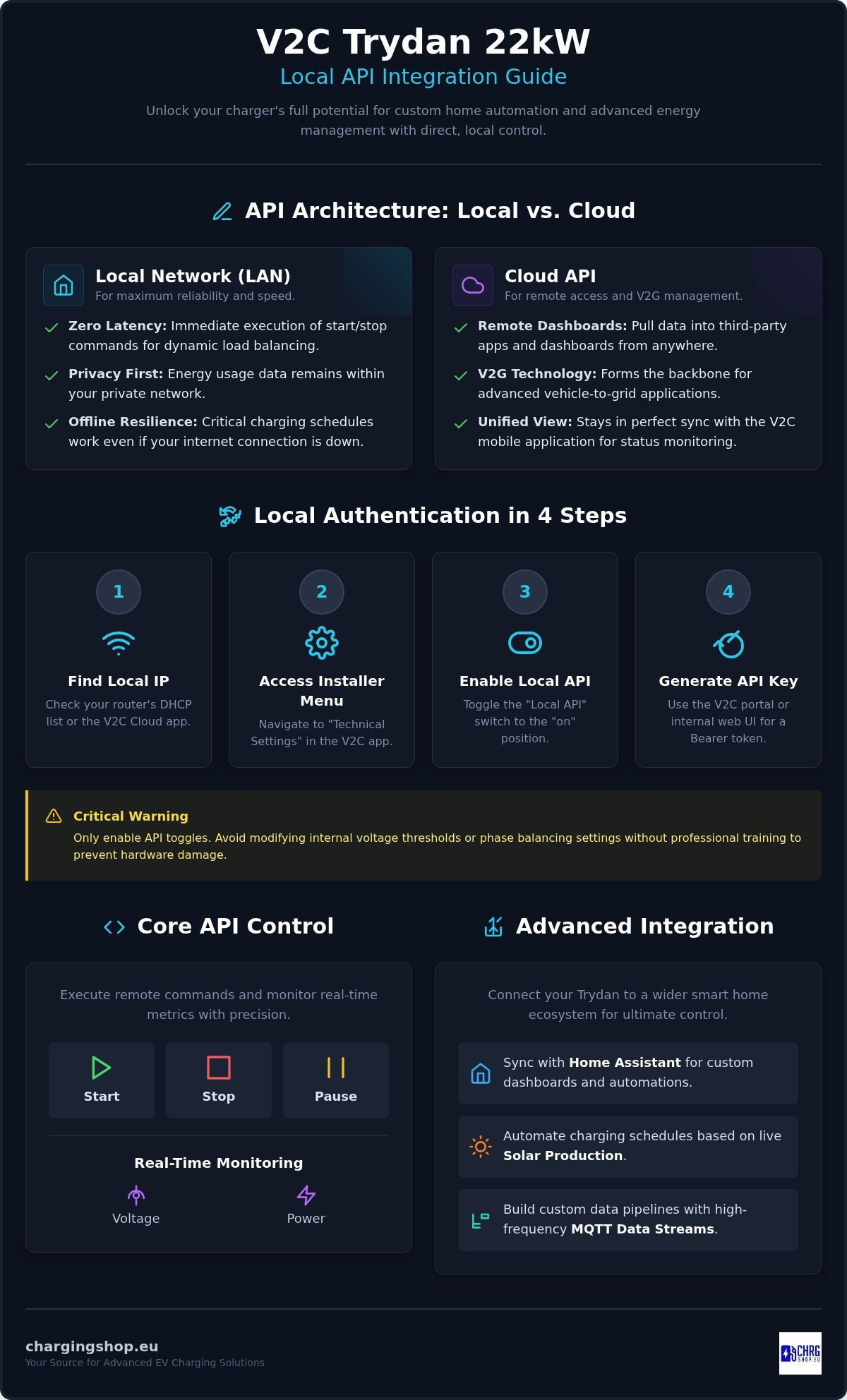
Local Network Control (LAN)
For maximum reliability, go local. Direct communication with your charger’s IP address offers the lowest latency possible. When your home automation system talks directly to the Trydan on your LAN, you bypass the public internet entirely. This setup is perfect for dynamic load balancing where every millisecond counts. You get zero-latency responses and the peace of mind that your car will charge even if your ISP goes down. It’s the most robust way to command your hardware.
- Zero Latency: Immediate execution of start and stop commands.
- Privacy First: Your energy usage data stays within your four walls.
- Offline Resilience: Critical schedules remain active without a cloud connection.
Security is a factor here. Local HTTP requests are often unencrypted, so don’t leave your network wide open. Segment your network to keep your charger on a secure VLAN. This prevents unauthorized access from other devices on your Wi-Fi while keeping your API endpoints accessible to your server.
Cloud API and V2C Cloud Integration
The Cloud API is your bridge to the outside world. It allows you to pull data into remote dashboards or third-party apps from anywhere. It’s the backbone of Vehicle-to-grid (V2G) technology management, where your EV acts as a battery for the wider ecosystem. While the 2026 firmware updates have improved cloud speed, you should still expect slight latency compared to LAN. Use the cloud for monitoring and the local API for time-sensitive control. The V2C mobile app stays in perfect sync with these API calls, giving you a unified view of your charging status at all times.
Step-by-Step: Authenticating and Connecting to Your Wallbox
Get your hardware talking. First, find the local IP address of your V2C Trydan 22kW. Check your router’s DHCP list or use the V2C Cloud app under the “Network” tab to identify the device. Once you have the IP, you’re ready to bridge the gap between your server and the charger. This V2C Trydan API integration guide ensures you don’t waste time on failed handshakes or incorrect headers. Use a simple ping command to verify the connection before moving to the authentication layer.
Accessing the Installer Configuration
Open the V2C app and navigate to the technical settings. You’ll need to enter the installer menu to unlock the full potential of the ESP32 controller. Toggle the “Local API” switch to enabled. This is the “on” switch for your custom integrations and third-party dashboards. Follow these steps to ensure a clean setup:
- Open the V2C Cloud App and select your specific device.
- Enter the “Configuration” menu and find the “Technical Settings” section.
- Enable the “Local API” toggle and save your changes.
Critical Warning: Stick to the API toggles. Avoid modifying internal voltage thresholds or phase balancing settings. Changing these without professional training can compromise hardware safety. If you’re looking for a pre-configured unit that supports these advanced features natively, check out the V2C Trydan 22kW ready for immediate deployment.
Generating Your First API Key
Security isn’t optional in 2026. Log in to the V2C Cloud portal to generate your unique API credentials. These tokens act as your digital passport for every request you send. For local-only setups, recent firmware versions allow for a Bearer token generated directly from the internal web interface. Never hardcode these keys in your scripts. Use environment variables or a secure secrets manager to keep your network safe. The V2C Trydan supports the Open Charge Point Protocol (OCPP), which standardizes how these authentication tokens are handled across different management platforms. Rotate your keys every 90 days to maintain a professional security posture and prevent unauthorized access.
Time for the “Hello World” of EV charging. Open your terminal and run a GET request to the status endpoint. If you get a 200 OK response with a JSON payload showing your current amperage and voltage, you’re officially connected. You’ve bypassed the generic setup and gained direct access to the charger’s logic. Now you’re ready to start building custom automation routines.
Core API Endpoints for Monitoring and Control
Execution is everything. Once authenticated, you need to know which levers to pull to maximize your energy ROI. While some forums suggest using complex Modbus maps, the JSON-based REST API is the fastest route for 99% of custom integrations. This V2C Trydan API integration guide focuses on the endpoints that deliver the most impact: real-time telemetry and active load management. For the full schema and specific header requirements, always reference the Official V2C API Documentation on GitHub. Requests are fast; responses are clear. You’ll get raw data in a format that’s ready for any modern dashboard or automation engine.
Don’t just monitor your charger; command it. The V2C Trydan 22kW allows for granular control that goes far beyond simple on/off toggles. You can adjust charging speeds based on your home’s total consumption or the current output of your solar array. This responsiveness is what separates a basic wallbox from a professional-grade energy node. It’s the perfect hardware for developers who demand technical precision and logistical reliability.
The Status Endpoint: What’s Happening Now?
The status endpoint is your primary source of truth. A simple GET request returns a JSON payload containing voltage, amperage, and power metrics for each phase. Mapping status codes is straightforward: a “0” typically indicates the charger is waiting for a vehicle, while a “1” confirms active charging. If you see an error code, the API provides specific diagnostic bits to help you troubleshoot without opening the casing. The ‘Intensity’ parameter represents the target amperage limit you set programmatically to control the charger’s output in real-time. Use this data to feed your custom Grafana dashboards or Home Assistant cards for instant visibility.
Control Endpoints: Taking Command
Taking control requires sending POST requests to the configuration endpoints. This is where you implement dynamic current adjustment. You can shift the charging intensity from 6 Amps up to 32 Amps per phase in real-time. This is crucial for avoiding peak-shaving penalties or maximizing self-consumption of renewable energy. Implementing a “Soft Stop” via the API is also better for your EV’s long-term health; it allows the vehicle to ramp down gracefully rather than cutting the contactor abruptly. If the ESP32 controller ever hangs due to a network glitch, you can even trigger a remote reboot via a dedicated API call, ensuring your system stays online without manual intervention. For commercial users, these endpoints also allow you to pull historical session data, making custom billing and reporting for the CHRG Network a breeze.
Advanced Integration: Solar, Home Assistant, and MQTT
Move beyond basic monitoring. The real power of the V2C Trydan 22kW lies in its ability to act as a reactive energy node. This V2C Trydan API integration guide wouldn’t be complete without mastering the feedback loops that turn a standard charger into a solar-intelligent powerhouse. By bridging your charger with external data sources, you ensure your EV only sips “green” electrons when they are most abundant. You can program the API to adjust the charging intensity in 1-Amp increments to match the exact curve of your solar inverter’s output in real-time.
Managing multiple units across a facility? For commercial or shared residential sites, integrating your hardware with CHRG Network Access via API allows for centralized billing and fleet-level load balancing. You can pull real-time data from every Trydan unit on your network to prevent transformer overloads while maintaining a seamless user experience for every driver. It’s the professional way to scale your charging infrastructure without adding manual administrative overhead. You get total visibility into energy distribution across your entire footprint.
Home Assistant and YAML Configuration
Connect your Trydan to Home Assistant for total ecosystem control. Use the native V2C integration or HACS to expose entities for current, voltage, and charging state. You can write YAML automations to trigger charging only when your solar production exceeds 1.4kW; this is the minimum threshold for most EVs to initiate a handshake. Create custom template sensors to track your “Daily Energy Cost” by multiplying real-time power data by your utility’s dynamic pricing API. This turns your smart home into a self-optimizing energy hub that responds to market prices and weather patterns automatically.
MQTT Bridging for Advanced Users
Stop polling and start streaming. For high-frequency data needs, configure your Trydan to publish directly to a local MQTT broker. This reduces network overhead on the ESP32 controller compared to repetitive REST API calls. By subscribing to specific topics, your custom dashboards receive instantaneous power updates every few hundred milliseconds. It’s the gold standard for developers building real-time visualizations or ultra-fast load-shedding logic. Use MQTT to keep your network light and your response times sharp. It’s the most efficient way to handle large-scale data pipelines without taxing the charger’s processor.
Ready to build your custom energy ecosystem? Get the V2C Trydan 22kW and start integrating your solar array today.
Troubleshooting and Optimizing Your API Setup
Don’t let a 401 Unauthorized error stall your project. Usually, this means your Bearer token expired or the local API toggle flipped off during a hardware reboot. A 404 Not Found error often points to a changed endpoint structure in a recent firmware update. As of July 14, 2026, firmware version 2.5.0 is the current standard for the Trydan series. Always verify your firmware version before debugging code. A quick update can often resolve inconsistent data reporting without you writing a single line of new script. This V2C Trydan API integration guide helps you stay ahead of these common technical hurdles.
Managing firmware updates is a critical part of your maintenance routine. While V2C prioritizes backward compatibility, new features like priority management can occasionally shift how data is parsed. Check the public release notes before hitting the “update” button in the app. If you’re running a custom dashboard, test the new version on one unit before rolling it out to your entire network. This proactive approach prevents unexpected downtime and keeps your energy management systems running at peak efficiency.
Network and Connectivity Fixes
Stability starts with your router. Assign a static IP address to your V2C Trydan 22kW immediately. If your DHCP lease renews and the IP shifts, your integration will break instantly. Connection timeouts are common in garages with high electromagnetic interference or weak Wi-Fi signals. Use cURL or Postman to test the endpoint directly from a laptop parked next to the unit. This isolates whether the issue lies in your home automation logic or the physical network layer. If the hardware responds to a manual cURL request but not your script, the bug is in your code.
Performance Optimization
Don’t DOS your own charger. The ESP32 controller is powerful, but it has limits. Set your polling interval between 5 and 10 seconds for local requests. Polling every second will eventually cause the internal web server to crash or become unresponsive. If you use the cloud API, implement exponential backoff. This ensures that if a request fails, your system waits progressively longer before retrying, preventing a rate-limit lockout. Batch your requests to pull all status data in one call rather than hitting individual endpoints for voltage and amperage separately. This reduces CPU load and keeps the hardware responsive.
Ready to expand your setup? Once you’ve mastered the API for a single unit, scaling to a multi-charger environment is the next step. Review the full V2C Trydan 22kW specs to understand the hardware limits for load balancing across multiple phases. Keep your code clean, your network stable, and your firmware current for a professional-grade charging experience.
Master Your Energy Ecosystem Today
You’ve moved beyond basic charging. By following this V2C Trydan API integration guide, you’ve unlocked a programmable energy node that responds to your home’s unique needs in real-time. From zero-latency local control to high-frequency MQTT streams, you now have the technical tools to build a truly intelligent charging setup. You’ve learned how to bypass cloud lag, optimize polling intervals, and integrate solar feedback loops for maximum energy efficiency.
The V2C Trydan 22kW isn’t just a wallbox; it’s professional hardware designed for smart home enthusiasts who demand total control. We provide these flagship units with global shipping, ensuring they’re ready to sync with Home Assistant and Victron systems right out of the box. Don’t let your energy management remain a black box. Upgrade your home setup with the V2C Trydan 22kW today!
Your smarter, more efficient energy future starts with a single API call. You have the guide and you have the endpoints. Now, it’s time to go build something great.
Frequently Asked Questions
Is the V2C Trydan API free to use for home owners?
Yes, local API access is a built-in feature of the hardware with no recurring subscription fees for individual owners. You can access your charger’s data and control functions for free as part of your initial purchase. This V2C Trydan API integration guide focuses on these open-access features to help you maximize your ROI. It’s the most cost-effective way to build a custom energy management system without hidden costs.
Can I control the V2C Trydan without the official app using the API?
Yes, the API gives you full control over your charging states without ever opening the official V2C app. You can send POST requests to start, stop, or pause charging sessions directly from your home automation server. This is perfect for developers who want to integrate charging into a unified dashboard. It allows for a truly custom user experience tailored to your specific household needs and schedules.
Does the V2C Trydan support Modbus TCP for industrial integration?
Yes, the V2C Trydan 22kW supports Modbus TCP alongside its RESTful API. This makes it a versatile choice for industrial environments or complex solar setups using Victron energy systems. While REST is often easier for web developers, Modbus provides a robust alternative for PLC-based automation. You can choose the protocol that best fits your existing infrastructure for seamless data exchange and power management. It’s built for professional flexibility.
What happens to my API integration if the internet goes down?
Nothing happens to your local integration if you lose internet connectivity. Because the local API communicates directly with the charger’s IP address on your LAN, it doesn’t rely on external servers. Your automated schedules and solar feedback loops will stay active as long as your local network is powered. This local-first approach is why many technical users prefer the Trydan over cloud-only competitors who lose functionality during outages.
Can I use the API to manage multiple V2C Trydan chargers simultaneously?
Yes, you can manage as many chargers as your network can handle by targeting their individual IP addresses. For commercial sites or apartment blocks, we recommend using CHRG Network Access. This service provides a centralized management layer that works with the API to handle complex billing and load balancing across multiple units. It simplifies the administrative side of running a larger charging footprint efficiently while keeping every unit perfectly synchronized.
Is there a limit to how many API requests I can send per minute?
The hardware doesn’t enforce a hard requests per minute limit, but the ESP32 processor has finite resources. We suggest a polling interval of 5 to 10 seconds to maintain system stability. Sending requests too frequently can cause the internal web server to hang or reboot. This V2C Trydan API integration guide recommends batching your status requests into a single call to keep the processor running smoothly without unnecessary overhead.
Do I need a special license to access the V2C Cloud API?
Standard cloud API access is included for all Trydan owners. You don’t need a special license for basic monitoring and control through the V2C ecosystem. However, if you’re running a business and need advanced features like automated user billing or public access management, you should look into a CHRG Network Access subscription. This provides the professional tools needed for commercial-grade operations and fleet management beyond simple home automation tasks.
How do I update the API token if it expires?
Update your token by logging into the V2C Cloud portal and generating a new set of credentials. For local Bearer tokens, you can often refresh them through the charger’s internal web configuration page. Once you have the new string, simply update the authorization header in your scripts or Home Assistant configuration. It’s a quick process that ensures your custom dashboards and automation routines remain secure and functional throughout the year.
