
 Deutsch
 Dansk
Dansk Suomi
Suomi Latviešu
 Lietuvių
 Norsk bokmål
 polski
 Русский
 Svenska
No products in the cart.
Uncategorized
EV Charger with Scheduling Function: How to Choose the Right One in 2026
29
Sep
Sep
What if the schedule you set isn’t the one your car follows? An EV charger with scheduling function can help shift charging to lower-cost off-peak hours, but the result depends on which control takes priority: the charger, the vehicle, or an app or utility service.
If you’re comparing chargers, you want a schedule that works without conflicts or missed charging sessions. Check how schedules are created, where they’re managed, and what happens if controls overlap or connectivity drops. An overnight plan is useful only if it fits your routine, your electricity tariff, and your vehicle’s charging settings.
This guide explains how charger, vehicle, and app schedules differ, then outlines what to check for compatibility, Wi-Fi or account requirements, tariff support, and reliable operation. You’ll be able to compare scheduling alongside other charger features and narrow your shortlist based on your setup. Charging Shop offers residential and commercial charging hardware, personalised charging offers, and CHRG Network access. Scheduling features vary by model, so confirm them in current manufacturer documentation. Arrange installation separately.
Key Takeaways
- Compare charger-led, vehicle-led, and platform-led controls to find where you’ll manage and view your schedule.
- For an EV charger with scheduling function, verify the controls and compatibility in current manufacturer documentation before you choose.
- Check your electricity tariff and charging routine; scheduling alone doesn’t guarantee lower costs.
- Use a practical checklist to prioritise reliable schedule settings and suitable connectivity over a long feature list.
- Shortlist hardware only after confirming its scheduling capabilities, then consider a personalised charging offer for your requirements.
What Does an EV Charger with a Scheduling Function Actually Do?
An EV charger with a scheduling function lets you set intended charging times or a charging window for an electric vehicle.
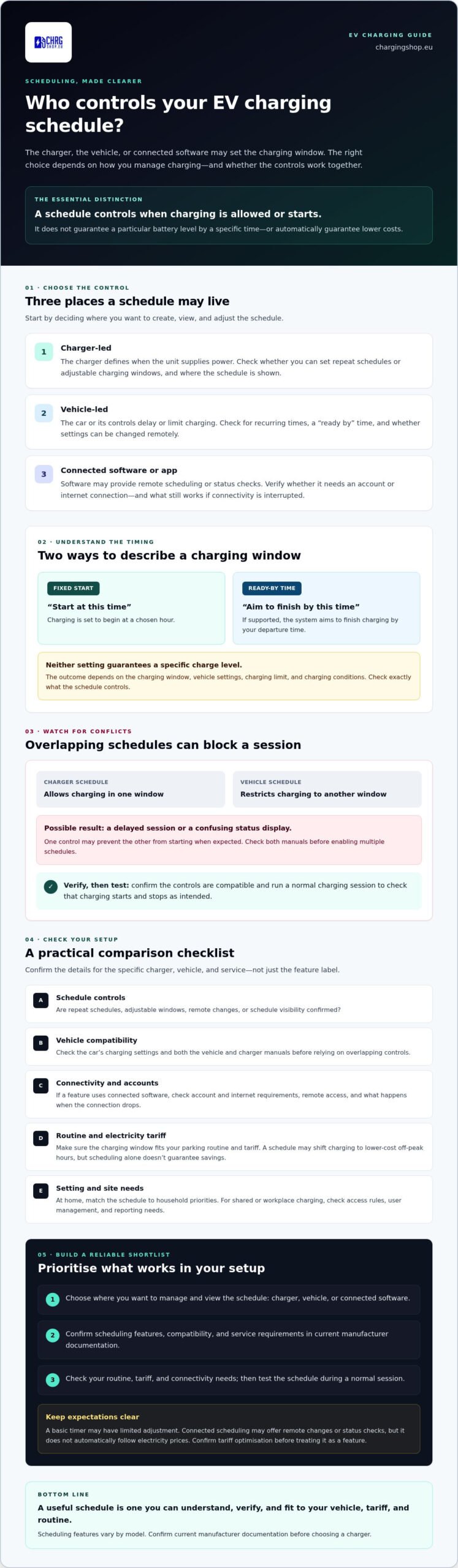
The schedule may be controlled by the charger, the vehicle, or connected software. It controls when charging is allowed or starts; it doesn’t guarantee a particular battery level by a specific time. The outcome depends on the charging window, vehicle settings, and charging conditions.
How scheduled EV charging works
Connect the vehicle, set a schedule in the relevant control, then check that charging starts and stops as intended. Options vary by charger, vehicle, software, and market, so confirm the available settings instead of assuming all systems work alike.
A fixed start time tells charging to begin at a chosen hour. A “ready by” time works in the other direction: if supported, the system aims to finish charging by your departure time. Neither setting guarantees that the vehicle will reach a particular charge level. Check the charging limit and confirm exactly what the schedule controls.
Charger schedule, vehicle schedule, or app control?
A charger setting can define when the unit supplies power. A vehicle setting can delay or limit charging through the car or its controls. Connected software may offer another way to set or change a charging window. Before relying on an app, check whether it requires an account or internet connection and which functions remain available if connectivity is interrupted.
Take care with overlapping schedules. If both the car and charger restrict charging to different windows, one may prevent the other from starting when expected. The result could be a delayed session or a confusing status display rather than a clear error. Check both manuals before enabling multiple schedules, then test the setup during a normal charging session.
Scheduling is separate from vehicle-to-grid operation. Vehicle-to-grid (V2G) technology describes interaction between EVs and the power grid, but V2G isn’t required to set a basic charging window. For everyday use, focus on which control manages the schedule, how you can check its status, and whether the vehicle and charger work together as expected.
Which Scheduling Controls Matter When Comparing EV Chargers?
Compare the control source first, then check which settings are confirmed for the charger and vehicle you plan to use. An EV charger with scheduling function may offer local timing, app-based control, or access through connected software. The features and any internet or account requirements vary by model and service.
| Control source | What to check | May suit |
|---|---|---|
| Charger settings | Can you set repeat schedules or adjustable charging windows? Is the schedule visible on the unit or in its controls? | Drivers who want charging managed at the charger. |
| Vehicle settings | Can the car set recurring times or a ready-by time? Can you change settings remotely? | Drivers who prefer to manage charging through the vehicle. |
| Connected software | Does it support remote changes and show schedule status? Does it require an app account or internet connection? | Users who want remote access or manage a shared setup. |
Use this as a comparison framework, not as a claim that every charger or car offers these options. Confirm repeat schedules, adjustable windows, remote control, and schedule visibility in current manufacturer documentation. If a feature relies on a third-party platform, check that provider’s requirements too. For a broader hardware comparison, compare scheduling options alongside connectivity and other smart features.
Simple timers versus connected scheduling
A basic timer starts or pauses charging at a set time, often with limited adjustment. Connected scheduling may let you change a window remotely or view its status, but access can depend on the charger, software, account, and connection. Don’t assume it automatically follows electricity prices. Look for manufacturer-confirmed tariff optimisation before treating that as a feature.
Scheduling for home, shared, and workplace charging
At home, match the schedule to your parking routine and household priorities. For a shared site, check whether the controls support the access rules and user management you need. At work, confirm that the charger’s scheduling and reporting capabilities fit the intended management system. In every setting, choose controls that are easy to check and adjust.
Quick guide: Vehicle-led scheduling can suit drivers who want controls in the car. Charger-led settings may appeal if you want timing managed at the unit. Connected software can help when remote access or site management matters. Verify the details before choosing. If you’re comparing hardware, explore EV charging hardware and note which scheduling requirements to confirm for each model.
Will an EV Charger Schedule Work with Your Car, Tariff, and Routine?
A schedule can move charging into a lower-rate period, but it won’t automatically reduce every driver’s bill. The outcome depends on your electricity tariff, when the vehicle is plugged in, how much energy it needs, and the tariff’s terms. An EV charger with scheduling function is useful only if its charging window fits both your routine and your plan.
Check tariff windows and the actual charging routine
Start with your electricity supplier’s current tariff details. Confirm the lower-rate hours, the days they apply, and any conditions that affect eligibility. Don’t assume there’s a standard overnight window: rates and terms vary by supplier and location.
Then compare those hours with when your car is usually parked and connected. For example, a driver who arrives home before an off-peak period and leaves after it may have a practical window for scheduled charging. If the car is often used during that period or isn’t plugged in consistently, the schedule may not fit. Treat any savings estimate as provisional until you’ve checked your tariff, charging pattern, and energy use.
Check vehicle and charger compatibility before purchase
Your vehicle can affect the result. Its charging limit, selected charge level, and settings may change how much energy it accepts or whether it follows a requested schedule. Check the vehicle manual for schedule controls and any behaviour that could override another setting. If both the charger and car offer scheduling, confirm how the controls interact before relying on either one.
Next, review the charger manufacturer’s current documentation for the exact model. Verify which scheduling controls it supports and whether they require an app account, internet access, configuration, or software updates. Don’t assume features are identical across models or available in every market. If a control depends on a connected platform, check its requirements and what happens if access or connectivity is interrupted.
Check locally before you commit. Tariff structures, electrical requirements, and relevant technical guidance can differ by country, region, utility, and installation. Confirm local requirements with the appropriate utility or authority, and have the proposed electrical setup assessed by a qualified professional. Don’t rely on a general guide to determine what applies to your site.
Before shortlisting, write down your usual plug-in and departure times, the tariff’s eligible hours, and the vehicle’s charging settings. Use those details to review manufacturer documentation and check whether the proposed schedule suits your real routine. This gives you a more reliable basis for comparing chargers than a feature label alone.
How to Choose an EV Charger with Scheduling: A Buyer’s Checklist
Choose a schedule you can understand and manage, not the charger with the longest feature list. Use this checklist to work from your daily routine to manufacturer-verified details, then shortlist hardware that fits your vehicle and site.
Five checks before shortlisting a charger
- Map your charging routine. Note when the vehicle is usually parked, plugged in, and needed again. Decide whether you need a repeat schedule, an adjustable charging window, or the ability to change plans remotely.
- Check vehicle requirements. Review the vehicle manual for its charging limits, built-in schedule settings, and any behaviour that may affect an external charger schedule.
- Confirm your tariff window. Check your supplier’s applicable hours and terms. Make sure the lower-rate period overlaps with the time your vehicle is connected.
- Set your connectivity needs. Decide whether local controls are enough or whether you need an app or connected platform. Verify any internet, account, or software requirements for the exact model.
- Choose who manages the schedule. Identify whether you or another household member will set and adjust charging times. Then verify the charger’s scheduling controls in current manufacturer documentation.
Check hardware capacity separately from scheduling. Confirm that the charger is suitable for your vehicle and the electrical supply at the intended site. Installation is separate from the charger purchase; check local requirements and whether your setup needs assessment or work by a qualified professional.
Questions to ask before ordering
Ask the seller or manufacturer to confirm how scheduling works on the exact model and software version you’re considering. Can you repeat or adjust a schedule? Where can you see its status? Does remote control require an app account or internet access? What happens if the car also has an active schedule?
Clarify what comes with the charger, what depends on a separate account or connected service, and what you need to arrange independently. If a specific scheduling feature is essential, don’t rely on a general product description.
Final compatibility check: Confirm your routine, vehicle charging limits and schedule behaviour, tariff hours and terms, charger controls, connectivity and account needs, site electrical capacity, and installation arrangements before ordering.
Once you’ve defined your requirements, request a personalised charging offer to help identify hardware options to investigate. Verify any scheduling capabilities against the manufacturer’s current documentation before choosing a model.
Compare Scheduling Options and Shortlist Charging Shop Hardware
The best scheduling setup depends on who needs to control charging. Charger-led scheduling keeps settings with the charging unit, while vehicle-led scheduling puts them in the car’s controls. Platform-led scheduling may suit users who need remote access or manage a site through connected software, but it can depend on an account, connectivity, or a third-party service. Each approach has trade-offs. Choose the one that fits your routine, then verify how it works with your vehicle.
Charging Shop’s V2C Trydan 22kW, Alfen Single Pro Line 22kW, and ABB Terra AC are hardware options to investigate, not confirmed recommendations for scheduling. Their specific scheduling controls, app or connectivity requirements, and current manufacturer documentation for those features need to be checked. Don’t assume a model supports your preferred schedule based on its name or category alone.
How to evaluate confirmed scheduling features on a shortlist
For each exact model and version, look for current manufacturer information that explains where schedules are set, whether they can repeat or be adjusted, how to check their status, and whether an app account or internet connection is required. Then match the documented features to your routine. A fixed window may be enough for regular overnight parking, while remote adjustments may matter if your plans change. For the V2C model, review the V2C Trydan 22kW charging guide alongside the manufacturer’s documentation, and confirm scheduling claims before relying on them.
For professional charging hardware, consult the Alfen Single Pro Line review and verify the scheduling controls for the exact unit and intended setup. If you’re managing a shared or workplace site, the CHRG Network management guide may be useful to your evaluation. Check what management functions it documents rather than assuming they include a particular scheduling feature.
Choose your next step with Charging Shop
Shortlist based on verified controls, vehicle compatibility, and your site’s requirements. Check product documentation directly, and arrange installation separately with a suitable local professional. Once you’ve identified what matters, request a personalised charging offer to discuss hardware options for your needs.
Choose a Schedule That Fits Your Setup
The right EV charger with scheduling function isn’t simply the one with the most controls. It’s the one that works with your vehicle, tariff, daily routine, and preferred way to manage charging. First, decide whether the charger, vehicle, or connected software should manage the schedule. Then verify the exact model’s documented controls, connectivity needs, and compatibility before you buy.
Keep the practical checks in view. Scheduling controls timing, not a guaranteed battery level or lower bill. Confirm your tariff terms, vehicle settings, and local electrical requirements, and arrange installation separately. These checks help you shortlist hardware based on what your setup actually needs.
Charging Shop offers a curated range of residential and commercial EV charging hardware, along with CHRG Network access and personalised charging offers. Explore options that match your requirements, and confirm scheduling features with current manufacturer documentation. Request a personalised charging offer to take the next step with a clearer shortlist. With the right checks in place, you can choose confidently and build a charging routine that works for you.
Frequently Asked Questions
Can I schedule charging with any EV charger?
No, scheduling isn’t available on every charger. Some vehicles can delay charging through their own settings, while other setups need a charger or connected platform with scheduling controls. Check an EV charger with scheduling function against the exact vehicle and charger models you’ll use. Read current manufacturer documentation to confirm supported schedule types, control methods, and any app or account requirements before you buy.
Is it better to schedule charging through the car or the charger?
Neither option is always better. Vehicle controls can be convenient if you mainly use one car and want charging settings managed there. Charger controls may suit a setup where you want timing managed at the charging unit. Connected software can offer remote access if supported. Compare the controls you need, then choose one primary schedule source where possible. Check both manuals before enabling schedules in the car and charger.
How do I set a charging schedule on an EV charger?
Check the charger manual to find out whether scheduling is set on the unit, in an app, or through connected software. Follow its steps to create a start time or charging window, then plug in the vehicle and confirm the displayed schedule and charging behaviour. If the vehicle has its own schedule, review those settings too. Test the setup during a normal charging session instead of assuming it’s active.
Will scheduled EV charging lower my electricity bill?
It can lower charging costs if your electricity tariff offers a cheaper period and the vehicle charges during those eligible hours. Savings aren’t guaranteed. They depend on your tariff’s rates and terms, the schedule, how much energy you use, and when the car is plugged in. Check your supplier’s current tariff details and compare them with your routine before estimating the effect on your bill.
Can my car and EV charger have different charging schedules?
Yes, both may have scheduling settings, but running separate schedules can cause unexpected results. For example, if the car allows charging only during one window and the charger supplies power during another, charging may start later than you expect. Behaviour varies by model. Check both manuals for schedule interactions and priority, then consider using a single schedule source to keep control clear.
Does an EV charger with scheduling need an internet connection?
Not always. A charger may support a locally configured schedule, while app-based or remotely managed controls may require internet access, an account, or both. Requirements depend on the exact model and software. Before choosing an EV charger with scheduling function, check the manufacturer’s instructions for setup and what happens if connectivity is lost. This helps you know which controls remain available when the connection is down.
