
 Deutsch
 Dansk
Dansk Suomi
Suomi Latviešu
 Lietuvių
 Norsk bokmål
 polski
 Русский
 Svenska
No products in the cart.
Uncategorized
EV Charger with Built-In Cable Management: A 2026 Buying Guide
27
Sep
Sep
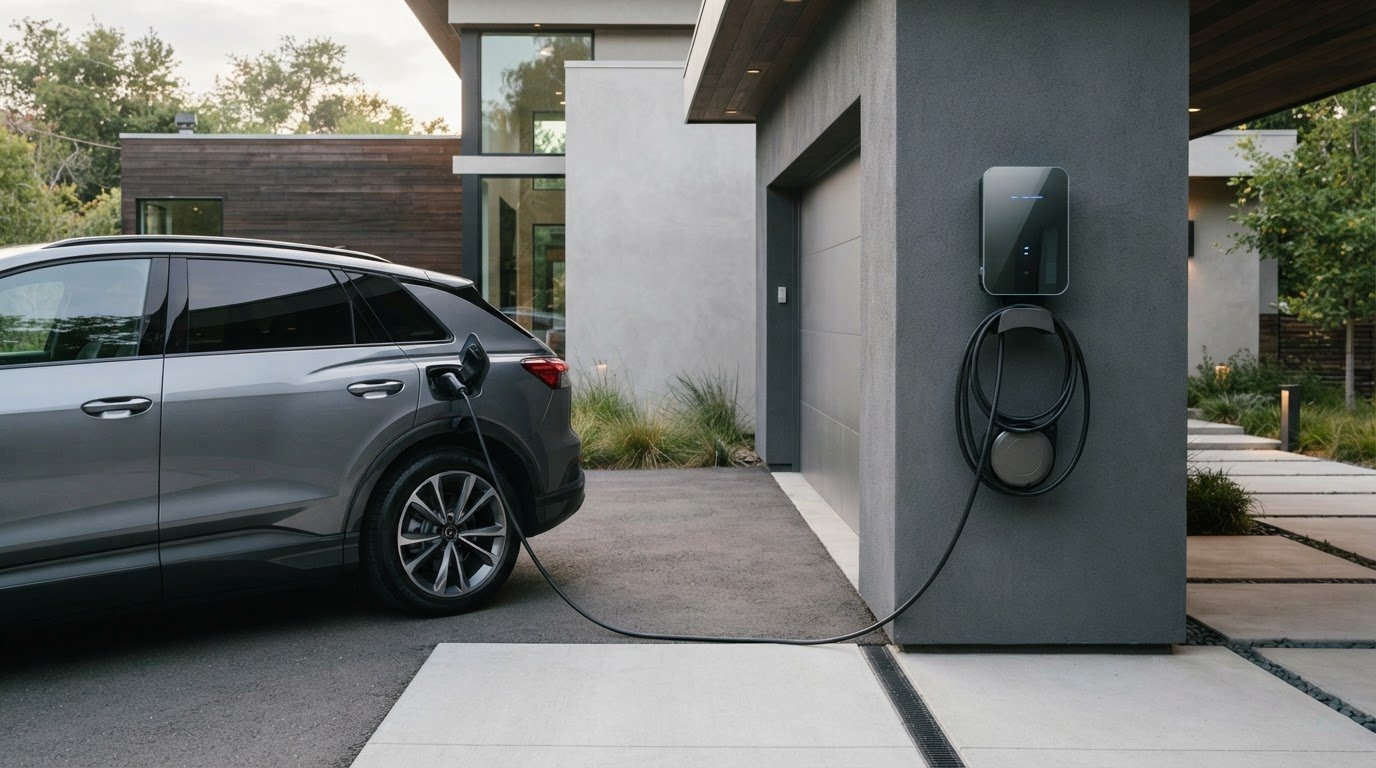
What if the neatest-looking charger isn’t the easiest one to use? A loose cable can clutter your garage, driveway, or charging bay, but an EV charger with built-in cable management can mean anything from a simple holster to a retractable system. The label alone doesn’t tell you what’s included or whether it will suit your space.
Look beyond appearance. A hook or holster can keep a cable off the ground with minimal fuss, while a retractor may offer a tidier setup but needs a suitable mounting position and compatible cable. The best choice depends on where you park, where your vehicle’s charge port is, and how you charge day to day.
This 2026 buying guide compares common cable-management designs and explains what to check before choosing a charger. You’ll learn how to confirm whether cable storage is built in or sold separately, check cable reach and mounting compatibility, and shortlist an option that fits your routine. Once you’ve set your requirements, compare charger options and verify each product listing for included components and compatibility.
Key Takeaways
- Choose a storage style that suits your parking layout, from a simple dock or hook to a retractable setup.
- Before buying an EV charger with built-in cable management, check which cable and storage components are included.
- Measure the route from the charger to your vehicle’s charge port, then confirm cable reach and connector compatibility.
- Plan the charger position around wall space, pedestrian paths, weather exposure, and where the cable will rest between sessions.
- Compare options such as V2C Trydan 22kW, Alfen Single Pro Line 22kW, and ABB Terra AC, then verify each listing’s details.
What Does “EV Charger with Built-In Cable Management” Actually Mean?
Cable management is the part of a charging setup that stores, supports, or guides the cable between sessions. On an electric vehicle supply equipment (EVSE) unit, “built-in” might mean a holder integrated into the charger’s casing, or a storage feature mounted beside it. Those designs aren’t the same, so check exactly what the product includes.
Also distinguish cable storage from the charging cable itself. A charger may have a tethered cable, include a detachable cable, or require you to source one separately. A holder shown in a product photo doesn’t confirm that a cable comes in the box.
What counts as built-in cable storage on an EV charger?
Check the storage mechanism, not just the wording. A hook supports a wrapped cable; a holster or dock holds the connector and may guide the cable into place. A retractor pulls cable back toward a storage point, while some setups use a separate wall- or ceiling-mounted unit. “Integrated” can describe any of these, so verify the exact arrangement.
Review product photos, technical specifications, and the included-items list. Confirm whether the cable is supplied, whether the holder is part of the charger or an accessory, and whether that accessory is compatible with the unit. If the listing only says “cable management,” ask the seller which components are included before buying.
Why cable organisation matters in everyday charging
Storing the cable keeps it off the ground and out of the way, helping keep the parking area orderly and reducing the chance of someone catching a foot or wheel on a loose lead. Placement matters too: a holder should make it easy to put the cable away without dragging it across a walking route or leaving it where vehicles can run over it.
At home, familiar users may value a simple place to return the cable after each charge. In a shared workplace bay, quick access and an obvious return point can make hand-offs between drivers more straightforward. In either setting, match the storage style to how people use the space.
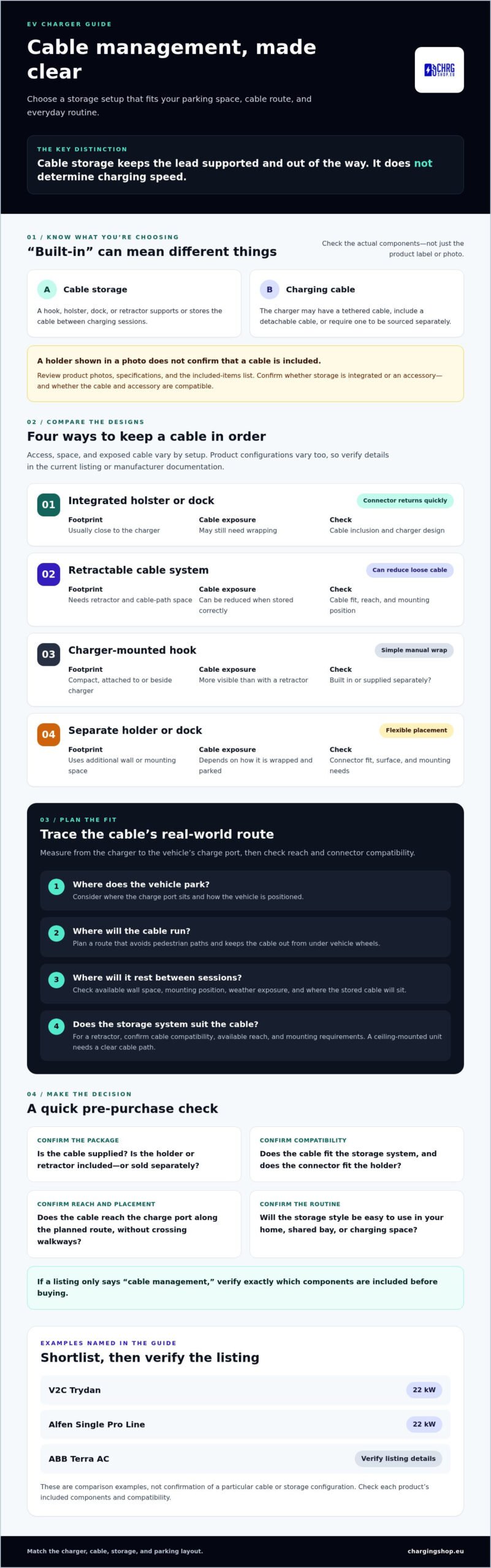
Cable management affects storage and access, not charging speed. Assess charging performance and cable organisation as separate requirements, then confirm that the cable, holder, and mounting arrangement work together.
EV Charger Cable-Management Designs: Retractable, Docked, or Separate?
Storage design affects how quickly you can stow the cable, how much space the setup needs, and how much cable remains exposed. Compare the mechanism with your parking layout and routine. No single option fits every site, and product configurations vary, so confirm details in the current manufacturer documentation.
| Design | Ease of access | Storage footprint | Cable exposure | Accessory dependence |
|---|---|---|---|---|
| Integrated holster or dock | Quick to return the connector | Usually close to the charger | Cable may still need wrapping | Depends on the charger design and whether a cable is included |
| Retractable cable system | Can be convenient if the cable retracts smoothly | Needs room for the retractor and cable path | Can reduce loose cable when stored correctly | Must suit the cable, reach, mounting position, and charger setup |
| Charger-mounted hook | Simple manual wrap and hang | Compact, attached to or beside the charger | More cable remains visible than with a retractor | May be built in or supplied separately; check the listing |
| Separate holder or dock | Easy if positioned within reach | Uses additional wall or mounting space | Depends on how the cable is wrapped and parked | Check connector fit, surface, and mounting needs |
Is a retractable EV charging cable the tidiest option?
A suitable retractor can keep more cable off the floor and make stowing it straightforward. But “retractable” doesn’t guarantee a fit: check compatibility with the cable, available reach, and mounting requirements. A ceiling-mounted unit, for example, needs a clear route that won’t pull the cable across a vehicle or walkway. Review installation guidance as part of planning EV charger installation. Don’t assume a retractor is included with a charger; confirm the exact product configuration.
When does a holder or separate cable dock make more sense?
A hook or dock can be a practical choice if your charger has no storage feature and you prefer a simple manual routine. Check that the holder suits the connector and cable, and that the mounting surface supports its placement. A separate accessory adds another component to position and may require additional mounting work, but it can offer flexibility if the charger lacks a convenient storage point.
Choose by matching access, space, cable route, and user habits, not by the label alone. Once you’ve set those requirements, explore the EV charger options and verify cable-management details on each product listing.
How to Compare EV Chargers with Cable Management Before You Buy
Use a checklist before choosing an EV charger with built-in cable management. Separate confirmed specifications from promotional terms such as “integrated” or “neat cable storage.” A clear product description should explain what stores the cable, what’s included, and which components are compatible. If those details are missing, ask the seller to confirm them before ordering.
- Cable supplied: Is it tethered, included separately, or not included?
- Storage mechanism: Does the unit have a hook, holster, dock, or retractor? Is it built in or an optional accessory?
- Reach: Will the cable reach the vehicle’s charge port along your planned route?
- Mounting location: Can the charger and storage component fit on the intended wall or other mounting surface?
- Connector and compatibility: Do the connector, cable, charger, and vehicle work together according to their documentation?
For a broader overview of types of EV charger cable management, compare how different support and storage mechanisms suit your site. Then verify the exact arrangement on the manufacturer’s current product page. Photos can help you understand the layout, but they don’t confirm what’s in the box.
Which cable reach and connector details should you verify?
Measure from the proposed charger position to the vehicle’s charge port, following the practical cable route rather than a straight line. Account for how the car parks and where the cable needs to pass. Confirm connector type and cable configuration against both vehicle and charger documentation. Don’t infer cable length or whether it’s tethered from an image; check the listing or ask the retailer.
What should the product listing say about included storage?
Look for an included-items list that identifies the cable, holder, dock or retractor, and any mounting hardware. Check for product-specific notes on accessory compatibility, plus photos showing where the cable rests between sessions. If “integrated” isn’t explained, get clarification before purchase so you know whether you need another component.
Keep cable management separate from charger performance. The storage design won’t determine whether the charger’s output suits your vehicle or whether your electrical setup can support it. Assess those requirements independently using product documentation and appropriate installation guidance. For more charger context, consult the 22kW home wallbox guide and the V2C Trydan 22kW buying guide.
Plan the Cable Route and Storage Around Your Parking Space
A tidy setup starts with the space, not the charger label. Before choosing an EV charger with built-in cable management, map where the vehicle parks and how the cable will travel to its charge port. The route should make charging and stowing straightforward without putting the cable under tension, forcing sharp bends, or blocking access.
- Map the parking position. Note where the vehicle sits and where its charge port is, including how that changes if different vehicles use the space.
- Locate the charger. Consider suitable wall positions, available clearance, nearby doors, and weather exposure.
- Plan cable reach. Trace the practical route from the charger to the inlet, avoiding walkways and places where the cable could be trapped or driven over.
- Confirm storage. Check that the holder, dock, or retractor can sit within reach without obstructing doors, pedestrians, or other users.
How do you check whether the cable will reach comfortably?
Measure along the route the cable will actually follow, not just the straight-line distance between charger and vehicle. Account for the vehicle’s position, charge-port location, and the path needed to handle and return the cable. Then check the charger’s documented cable configuration and reach. Don’t finalise the mounting position based on a product photo or assumed cable length.
Check the planned route in practice. The cable should reach without pulling tight, catching on edges, or creating a trip obstruction. Follow the manufacturer’s instructions for cable handling, and ask a qualified local electrical professional to assess installation questions.
How should storage work in a garage or shared parking area?
In a garage, check wall clearance, door movement, and where the connector will rest between sessions. A storage point that looks convenient on a plan may interfere with a door or leave the cable in a vehicle’s path. Outdoors, consider weather exposure and whether the chosen storage arrangement suits the location.
For shared bays, keep walkways clear and make the return point easy for users to identify. Review commercial projects against site requirements with the responsible facilities or electrical professional.
Charging Shop sells EV charging hardware but doesn’t provide on-site installation. Get qualified local advice on the proposed location and electrical work, then compare hardware against the route and storage needs you’ve mapped. Explore EV charger options and confirm each product’s cable, storage components, and compatibility before ordering.
Shortlist a Charger and Confirm Its Cable-Management Setup
Start with the storage method that fits your parking space, then check the charger, cable, and any holder or retractor as one compatible setup. A charger’s inclusion in a hardware range doesn’t confirm that it has built-in cable management. Verify the current product details before treating it as a match for your requirements.
Charging Shop’s confirmed hardware range includes the V2C Trydan 22kW, Alfen Single Pro Line 22kW, and ABB Terra AC. These are options to compare, not confirmed cable-management matches. Review each product’s current specifications for cable type and inclusion, storage components, connector, and compatibility. For product-specific context, consult the Alfen Single Pro Line 22kW review alongside its current documentation.
How to verify a shortlisted charger’s exact configuration
Use the product listing and manufacturer documentation to confirm what’s supplied and how it fits your vehicle and planned setup. Check for details on cable configuration, holder or dock, retractor, and mounting components. Don’t assume an item is included because it appears in a photograph. If “integrated” or “cable-ready” isn’t clearly explained, ask the retailer to clarify before ordering.
Keep your questions specific: Is a cable included? Which storage parts come with this configuration? Are they compatible with the cable and mounting location you intend to use? Clear answers help you compare the complete setup, not just the charger description.
What to prepare before requesting a personalised charging offer
Share the information that affects your shortlist: where the charger will be used, your vehicle’s connector, the parking layout, and your preferred charger location. Explain whether you need storage built into the charger or can use a separate compatible accessory. This gives the offer a practical starting point without assuming a particular configuration will fit.
Compare specifications and confirm any unresolved details before purchase. Compare EV charging hardware at Charging Shop or request a personalised charging offer, and verify the cable-management setup for the specific product you’re considering.
Choose a Tidy Setup That Fits Your Routine
The right EV charger with built-in cable management is the one whose storage design suits your parking space, cable route, and charging habits. A holster, hook, dock, or retractor can each work well in the right setup. Check what’s included, confirm cable reach and connector compatibility, and don’t rely on product photos or broad “integrated” claims alone.
Once you’ve defined those requirements, compare charger specifications separately from cable storage. Charging Shop’s confirmed range includes EV charging hardware for residential and commercial applications, alongside personalised charging offers for shoppers weighing their requirements. Verify current product documentation for cable configuration, storage components, and compatibility before choosing a specific model.
Ready to shortlist options? Compare EV charging hardware at Charging Shop and check the details that matter for your space.
Frequently Asked Questions
What does an EV charger with built-in cable management mean?
An EV charger with built-in cable management has a feature or integrated storage arrangement that supports, stores, or guides its cable between charging sessions. This might be a charger-mounted hook, connector holster, dock, or retractable system. The phrase doesn’t confirm that a charging cable is included or that storage is fully integrated into the unit. Check the product specifications and included-items list to confirm the exact configuration.
Are EV chargers with built-in cable management worth it?
They can be worthwhile if the storage design suits your parking space and charging routine. A hook or holster may keep the connector off the ground, while a retractor can reduce loose cable when correctly matched and positioned. Consider how often you charge, available wall or ceiling space, and whether the feature is included or sold separately. Cable management helps organise storage, but doesn’t determine charging speed.
Can I add cable management to an EV charger that does not include it?
You may be able to add a separate hook, holder, dock, or retractor, provided it’s compatible with your cable and suitable for the mounting surface. Check connector fit, cable routing, mounting requirements, and the charger manufacturer’s guidance before choosing an accessory. Position it so the cable can be returned easily without obstructing walkways or pulling tight. If compatibility is unclear, ask the retailer or manufacturer to confirm.
Do EV chargers with cable management include a charging cable?
Not necessarily. A cable holder, holster, or retractor describes how a cable is stored, not whether the cable comes with the charger. Depending on the product configuration, a charger may have a tethered cable, include a separate cable, or require one to be purchased separately. Don’t infer what’s included from product photos. Check the current product listing and documentation for cable type and included components.
How long should an EV charger cable be for home use?
Many EV charging cables are typically 18 to 25 feet long, but the right reach depends on your parking layout. Measure the route from the planned charger location to the vehicle’s charge port, allowing for how the cable will be handled and stored. A straight-line estimate may fall short if the cable must go around an obstacle. Confirm the exact cable length in the product documentation before choosing a mounting location.
Can I install an EV charger with built-in cable management myself?
Installation requirements depend on the charger, electrical work, and local rules. Under the 2026 NEC, permanently installed hardwired EV chargers require installation by a qualified person, generally interpreted as a licensed electrician, where that code has been adopted. Adoption is state-by-state. Installing a new 240-volt outlet for a plug-in charger typically also requires an electrician. Check local requirements and seek qualified advice rather than assuming DIY installation is allowed.
Is a retractable EV charger cable better than a cable holder?
Neither is universally better. A retractor can keep more cable off the floor, but it needs a suitable mounting position and must be compatible with the cable and planned reach. A holder is often simpler, though it may leave more cable visible and requires manual wrapping. Compare available space, access, cable routing, and user habits. Confirm whether storage is included or needs to be purchased separately.
