
 Deutsch
 Dansk
Dansk Suomi
Suomi Latviešu
 Lietuvių
 Norsk bokmål
 polski
 Русский
 Svenska
No products in the cart.
Uncategorized
V2C Trydan: Top HomeAssistant Compatible EV Charger Guide
05
Aug
Aug
Stop letting cloud downtime dictate when your car charges. Your smart home deserves better than laggy apps and broken manufacturer APIs. If you are hunting for the best HomeAssistant compatible EV chargers V2C Trydan is the definitive answer for local control. It is time to move past basic charging and turn your garage into a high performance energy hub.
You want a charger that talks to your house, not just a remote server. We understand the frustration of trying to sync solar production with a charger that won’t respond when the clouds move. By integrating the V2C Trydan 22kW with Home Assistant, you will unlock local control and advanced automation for a truly smart energy ecosystem. No more waiting on external servers to catch up with your commands.
This guide covers everything you need to master your setup. We will preview real-time monitoring dashboards, automated charging based on dynamic electricity prices, and seamless solar-to-EV energy routing. Get ready to build a faster, more reliable charging experience today. Let’s dive into the technical details of the V2C Trydan integration.
Key Takeaways
- Master the setup by locating your charger’s IP and securing it on your local network for immediate discovery.
- See why HomeAssistant compatible EV chargers V2C Trydan offer superior local API control to keep your schedule running during internet outages.
- Optimize your energy bills with scripts that automate charging based on real-time solar output and dynamic market pricing.
- Ensure long-term stability by implementing static IPs and wired connections to eliminate common dashboard errors.
- Source your V2C Trydan 22kW from authorized experts to get fast shipping and professional hardware support.
Why V2C Trydan is the Best Home Assistant Compatible EV Charger
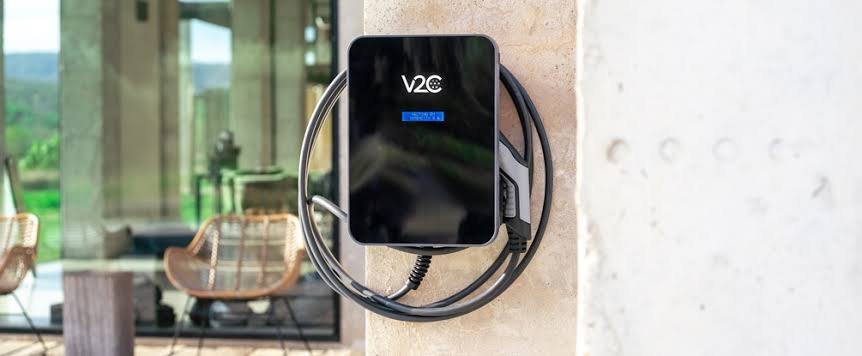
V2C Trydan isn’t just another wallbox. It’s a specialized tool designed for the modern smart home ecosystem. Most manufacturers lock you into proprietary apps. They want your data on their servers. V2C takes the opposite approach. It offers native integration that requires zero hardware hacking or complex workarounds. You get a professional grade solution that works with your existing setup immediately. Stop settling for closed systems that limit your creativity.
When researching HomeAssistant compatible EV chargers V2C Trydan consistently tops the list because of its open architecture. It uses a robust local API. This means your charging commands don’t travel to a remote server just to trigger a session in your own driveway. You get high frequency data updates. These feed directly into your HA Energy Dashboard with surgical precision. It’s the difference between guessing your consumption and knowing it to the decimal point. Precise data drives better decisions.
Dual management is a standard feature here. You don’t have to choose between the V2C Cloud app and Home Assistant. Use both simultaneously. The official app provides a quick interface for guests or simple manual overrides while you’re away. Meanwhile, Home Assistant handles the heavy lifting of your complex energy logic. It’s a seamless experience that prioritizes user choice over manufacturer restrictions. This flexibility is what makes it a leader in the smart charging space.
The Power of Local Control vs. Cloud APIs
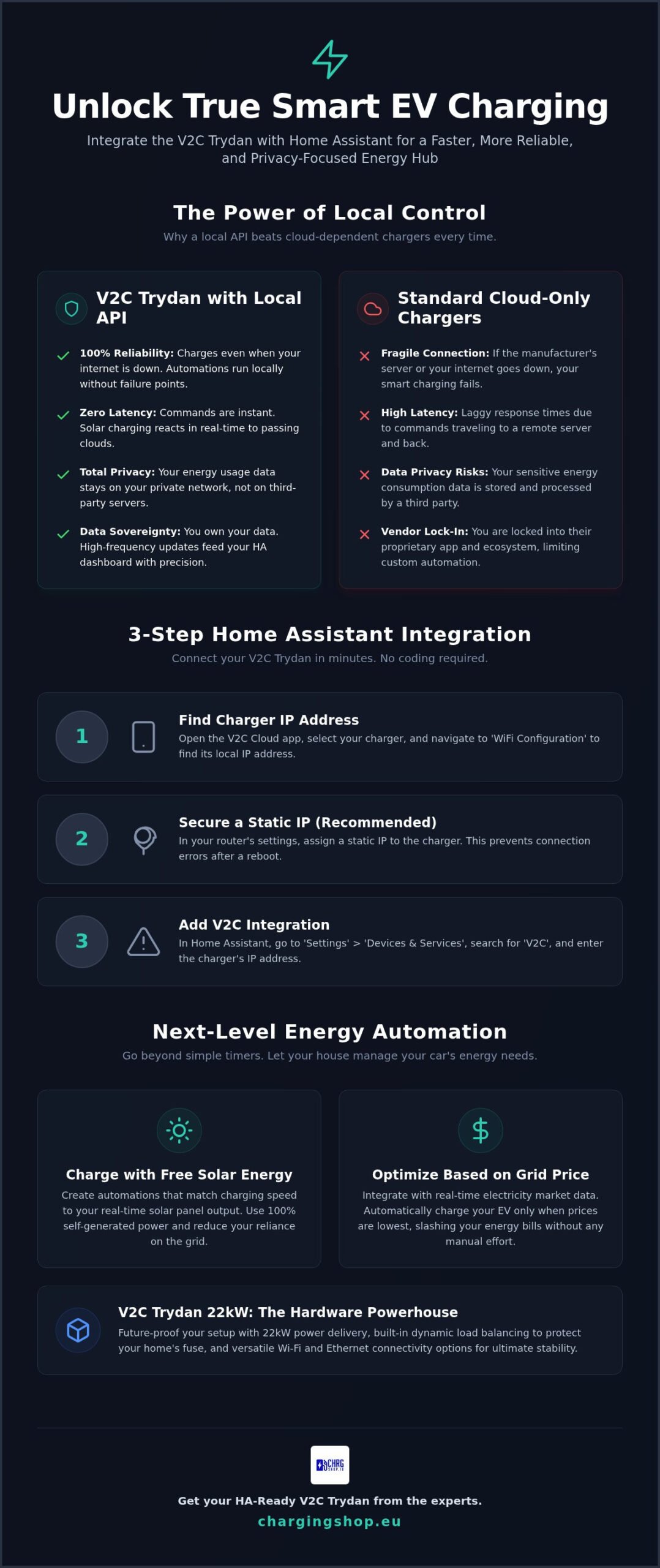
Cloud APIs are inherently fragile. If a manufacturer’s server goes down, your smart automation fails. Local control changes everything. Commands execute instantly with zero latency. Your charging schedule stays active even if your internet service provider has an outage. It is a privacy first strategy. Your energy usage patterns stay within your local network. You maintain 100% reliability during manufacturer server maintenance. It’s your hardware. You should be the one in control at all times.
V2C Trydan 22kW Hardware Synergy
Software is only half the story. High performance hardware completes the package. You can future proof your home energy setup with V2C Trydan 22kW power delivery. This unit is built for speed and intelligence. It features built in dynamic power management that talks directly to your HA sensors. It balances the load across your property in real time. The design is compact, durable, and purpose built for integration. You get a powerhouse that fits perfectly into a sophisticated smart home grid.
- Zero Latency: Instant response times for every automation trigger.
- Data Sovereignty: Keep your charging history off third party servers.
- Load Balancing: Protect your home’s main fuse with intelligent current adjustment.
- Versatility: Works perfectly with both Wi-Fi and Ethernet connections.
Step-by-Step: Integrating V2C Trydan with Home Assistant
Connecting your hardware shouldn’t be a headache. V2C makes it straightforward. First, confirm your Trydan charger and Home Assistant instance share the same local network subnet. If they can’t see each other, the integration will fail. This is the most common pitfall for new users. Check your router settings to ensure no guest network isolation is blocking communication between your devices. Integrating HomeAssistant compatible EV chargers V2C Trydan is a fast process when you have the right data.
The native integration is your best friend here. It is built to handle high-frequency updates without crashing your dashboard. You don’t need to be a coder to get this running. Just follow the logic. Once the physical connection is stable, the software side takes only a few minutes. Speed and reliability are the goals. Let’s get your charger talking to your house.
Finding Your V2C IP Address
You need the charger’s unique identifier to start the handshake. Open the V2C Cloud app on your smartphone and select your specific e-Charger from the main list. Navigate to the settings icon in the top right corner and click on ‘WiFi Configuration’ to see the network details. Your local IP address will be clearly displayed in this menu. To keep your connection rock solid, assign a static IP to your charger within your router’s DHCP settings so the address never changes after a power cut or router reboot.
Now, switch to your Home Assistant dashboard. Go to the ‘Settings’ menu and select ‘Devices & Services’. Click the ‘Add Integration’ button in the bottom corner and search for ‘V2C’ in the list. The system will prompt you for the local IP address you just identified. Type it in and click submit. Home Assistant will immediately pull in all available entities. You’ll see sensors for current, voltage, and charging status ready for use. Configure these entities and add them to your preferred Lovelace dashboard to see your data in real time.
Using HACS for Advanced Customizations
Power users often look for more than the basics. If the native features don’t meet every specific need, install the Home Assistant Community Store (HACS). You can search for the V2C custom repository to access experimental sensor data and community-developed scripts. However, for maximum stability in 2026, we recommend sticking to the native integration. It is official, tested, and less likely to break during core HA updates. If you want to ensure you have the right hardware for this setup, you can request a personalised charging offer from our team of experts.
Don’t just collect data. Visualize it. Add your new entities to your dashboard using gauge cards or power distribution cards. This gives you a real-time view of your car’s energy consumption at a glance. It’s about turning raw numbers into actionable insights for your household. You are now ready to move on to the automation phase.
Top 3 Home Assistant Automations for V2C Trydan
Connecting your charger is just the beginning. The real power of HomeAssistant compatible EV chargers V2C Trydan lies in the logic you build around them. You’ve moved past simple scheduling. Now, you can orchestrate your entire home’s energy flow to save money and reduce your carbon footprint. These three automation recipes turn a standard charging session into a high-performance energy strategy.
Smart load shedding is a critical first step for any high-power installation. Don’t risk tripping your main breaker when your lifestyle demands more energy. You can set up a priority logic in Home Assistant that monitors your total household consumption. When high-draw appliances like electric ovens or heat pumps activate, HA sends a command to temporarily pause your V2C Trydan. Once the appliance finishes its cycle, the charger resumes automatically. It’s a hands-off way to protect your infrastructure while maintaining maximum charging speed.
Maximizing Solar Self-Consumption
Stop exporting your clean energy back to the grid for pennies. You can link your solar inverter sensors directly to the Trydan ‘current intensity’ entity in Home Assistant. This allows your charger to act as a variable load that follows the sun. Set a threshold of 6A as your starting point. Most EVs require at least 6A to initiate a handshake and begin charging. If your solar production drops below this level, the automation can pause the session to prevent grid pull. Create a ‘Green Only’ helper toggle in your HA dashboard. This gives you a simple switch to choose between standard grid charging and pure solar-to-EV energy routing.
Automating Based on Time-of-Use Tariffs
Take advantage of market volatility to slash your fuel costs. If you use a provider like Tibber or Nord Pool, you can feed live pricing data into your logic. Use the Home Assistant ‘Price’ sensor to scan the next 24 hours and identify the cheapest 4-hour window tonight. Your V2C Trydan can then be programmed to unlock and start charging only during those specific low-cost hours. It’s a set-and-forget system that ensures you always fill up at the best possible rate. To avoid morning surprises, add a safety notification. If the car isn’t plugged in by 10:00 PM, have Home Assistant send an alert to your phone. It’s a proactive safeguard that ensures you’re always ready for the morning commute.
These automations transform your charger from a passive appliance into an active participant in your smart home. You’re no longer just plugging in a car. You’re managing a sophisticated energy ecosystem that responds to your environment in real time. The flexibility of the V2C platform makes these advanced configurations possible without proprietary roadblocks.
Stability and Security: Protecting Your Smart Charging Setup
Don’t build a sophisticated energy ecosystem on a shaky foundation. Reliability is the backbone of any smart home project. When you invest in HomeAssistant compatible EV chargers V2C Trydan is the gold standard for integration, but its performance depends on your network. Use a wired Ethernet connection whenever possible. Physical cables beat wireless signals every time. Garages are notorious for dead zones and signal interference from thick concrete walls or metal doors. A hardwired connection ensures your data packets arrive without delay and your automations never miss a beat.
Stop chasing “entity not found” errors in your logs. Every time your router reboots, it might assign a new IP address to your hardware. This breaks the handshake between Home Assistant and your charger. Set a static IP in your router’s DHCP reservation table immediately. It’s a five minute task that saves hours of troubleshooting later. Once the IP is fixed, set up a “Charger Offline” alert in Home Assistant. Use a binary sensor trigger to send a mobile notification if the status changes to “unavailable.” You should never wake up to an empty battery because of a minor network glitch that went unnoticed.
Security is a professional requirement, not an optional extra. Isolate your V2C Trydan on a dedicated IoT VLAN. This keeps your vehicle and charging data separate from your main home network where your personal computers and sensitive files live. It’s a best practice that minimizes the attack surface of your smart home. You get the benefits of local control without exposing your entire digital life. High performance charging requires a high performance network strategy.
Troubleshooting Connection Drops
Always verify signal strength at the installation point if you must use Wi-Fi. A weak signal below -75dBm will cause intermittent dropouts that ruin your automation accuracy. Check your firewall settings to ensure your network isn’t blocking local API calls on port 80 or 443. If the hardware looks fine but the data stops flowing, try restarting the V2C integration in HA before you touch any physical buttons. Most software hitches are resolved with a simple integration reload.
Firmware Updates and Compatibility
Keep your hardware current to maintain peak performance. Always update the V2C firmware via the official app before you start troubleshooting Home Assistant issues. Manufacturer updates often patch the very API bugs you’re trying to fix manually. Before performing major Home Assistant core updates, check the release notes for breaking changes to the V2C integration. Always backup your HA configuration before applying any significant system updates. Ready to upgrade? Buy HA-ready hardware from experts at Charging Shop to ensure your project starts with the best components.
Get Your HA-Ready V2C Trydan from Charging Shop
Building a sophisticated smart home ecosystem requires more than just code. It requires high-performance hardware that arrives on time and works as promised. At Charging Shop, we specialize in the logistics of smart energy. We stock the latest V2C Trydan 22kW models, ensuring you get the exact hardware needed for full HA compatibility. Don’t waste weeks waiting for backordered parts from unreliable suppliers. Our fast global shipping keeps your project on schedule. When you are searching for HomeAssistant compatible EV chargers V2C Trydan is the top choice, and we are the primary source for HA-ready units.
Technical support isn’t a luxury here; it’s a standard feature. Our experts understand the nuances of OCPP compliance and local API integration. We help you choose the right hardware for your specific HA setup, whether you’re a DIY enthusiast or a professional installer. If your project demands different specifications or professional-grade alternatives, explore our full range of Alfen Single Pro Line and ABB hardware. We provide the tools you need for professional-grade installations that last for years.
Personalized Charging Offers
Large-scale projects require a different approach than a single-family garage. If you need a bulk order for a smart apartment complex or a multi-unit residential development, we provide custom quotes tailored to your specific volume and technical requirements. You can combine your hardware purchase with CHRG Network access to unlock advanced commercial management and billing features. Trust our 2026 hardware guide to lead you to the most reliable smart chargers on the market today. We simplify the procurement process so you can focus on the automation logic.
Why Choose Charging Shop?
We are more than a retailer; we are your technical partner in the EV space. You get direct access to premium brands like V2C, Alfen, and ABB without the typical retail friction or long lead times. Our focus is transactional efficiency. We strip away the fluff to get the best hardware to your door as quickly as possible. Join thousands of smart home enthusiasts who trust our hardware expertise to power their garages. High-performance charging starts with the right partner. Order your HomeAssistant compatible EV chargers V2C Trydan unit today and start building your energy future.
- Direct Brand Access: We work closely with V2C to ensure you get authentic, updated hardware.
- Expert Guidance: Speak to specialists who actually know how Home Assistant works.
- Global Logistics: We ship high-power charging units to your doorstep, wherever you are.
- Scalable Solutions: From single wallboxes to commercial charging networks, we have the stock.
Future-Proof Your Home Energy Grid
Local control is the new standard for reliability. You’ve seen how local APIs turn a standard wallbox into a high-performance energy node that works even when the internet doesn’t. By connecting your solar panels directly to your charging logic, you stop wasting green energy and start saving money. Stability is the final step. A wired connection and a static IP keep your dashboard active and your battery full every single morning.
Among the best HomeAssistant compatible EV chargers V2C Trydan is the clear winner for users who demand data sovereignty and technical flexibility. It is the missing link in your smart home energy strategy. As an authorized V2C retailer, we provide the OCPP and HA compatible hardware your project requires. We offer fast global shipping to ensure you never have to wait on backordered stock. Our team is ready to help you finalize your technical specifications.
Shop V2C Trydan 22kW Chargers Now and take total command of your energy future today. Your smart home is ready for a professional upgrade.
Frequently Asked Questions
Is V2C Trydan natively supported by Home Assistant?
Yes, V2C Trydan has a native integration in Home Assistant. You don’t need to install third-party scripts or complex custom repositories to get the basics running. Simply search for “V2C” in the Devices & Services menu to start the process. It is one of the most reliable HomeAssistant compatible EV chargers V2C Trydan options because the integration is community-tested for core stability and rapid data updates.
Do I need the V2C Cloud app if I use Home Assistant?
You still need the V2C Cloud app for initial hardware commissioning and essential firmware updates. While Home Assistant handles your daily automations, the official app is the only way to push manufacturer software patches to the unit. Use the app for the first WiFi handshake and then let your smart home server take over for routine management. It is a dual-management system that offers both professional control and manufacturer support.
Can I control charging speed through Home Assistant?
You can adjust the charging current in real-time through the ‘current intensity’ entity in your dashboard. This allows you to scale the speed from 6A up to your charger’s maximum physical limit. It’s the core component for building load-balancing or solar-tracking scripts. You get granular control over exactly how much power your vehicle pulls from the grid at any given moment, making it a professional choice for energy management.
What happens if my Home Assistant server goes offline?
Your charger will continue to operate based on its last received command if your server fails. It won’t suddenly stop charging your vehicle just because Home Assistant is down. However, any active automations or dynamic load balancing will pause until the server is back online. Setting a sensible default charging current in the V2C app ensures your car is always ready for the morning, regardless of your local network status.
Does the V2C Trydan integration support solar excess charging?
Yes, it fully supports solar excess charging when paired with your home’s power sensors. You can write automations that match the charging speed to your real-time solar production. This ensures you only use clean, self-generated energy for your commute. It is a primary reason why many users choose HomeAssistant compatible EV chargers V2C Trydan for their sustainable energy projects. You can even define specific “Green Only” modes for maximum efficiency.
Is the V2C Trydan 22kW better than the 7kW version for Home Assistant?
The 22kW version is superior for future-proofing and faster charging on three-phase electrical systems. While the Home Assistant integration works identically for both power models, the 22kW hardware provides more headroom for vehicles with larger onboard chargers. Investing in the higher-capacity unit ensures your infrastructure can handle next-generation EVs without needing a hardware replacement. It is a smarter long-term investment for any high-performance smart home.
How do I find the IP address of my V2C charger?
Find your charger’s IP address by opening the V2C Cloud app and entering the ‘WiFi Configuration’ menu. The local address is clearly listed under the network status section. Once you have this number, we recommend reserving it in your router’s DHCP settings. This prevents the address from changing and breaking your Home Assistant entities after a power cycle. A stable IP is the foundation of a reliable smart charging setup.
Can I use MQTT with the V2C Trydan?
Yes, the V2C Trydan supports MQTT for users who prefer a broker-based communication method. This is an excellent alternative if you want to bypass the standard integration for a completely custom data pipeline. You can subscribe to topics for real-time power metrics and publish commands to control the charging state. It offers maximum flexibility for advanced technical environments and custom dashboard builds that require specific data points.
