
 Deutsch
 Dansk
 Suomi
 Latviešu
 Lietuvių
 Norsk bokmål
 polski
 Русский
 Svenska

No products in the cart.
Uncategorized
How to Create an EV Charging Schedule for Daily Driving

28
Oct
Your EV doesn’t need to start charging as soon as you plug it in. Creating an EV charging schedule means setting a charge target and choosing when charging should begin, often based on your usual departure time. With smart charging, your vehicle or charger follows those settings automatically.
It’s easier to build a routine when you know what an automatic schedule controls. Set a daily charge target that suits your driving, choose charging times that fit your routine, and adjust individual days when plans change. This guide explains how smart charging works, how to choose a target charge level, and how to create a practical schedule for each day, so you can charge without managing every session by hand.
Key Takeaways
- Match charging times to your electricity plan and daily routine, then adjust when your local rate periods or driving needs change.
- Use automatic smart charging to follow a schedule, and learn when you can override it for an unexpected trip.
- Choose a charge target around your usual driving needs, with a higher target for days that call for more range.
- Set separate charging times for each day so the car is ready when you need it, without charging to the same pattern all week.
What are Electric Vehicle Charging Best Practices?
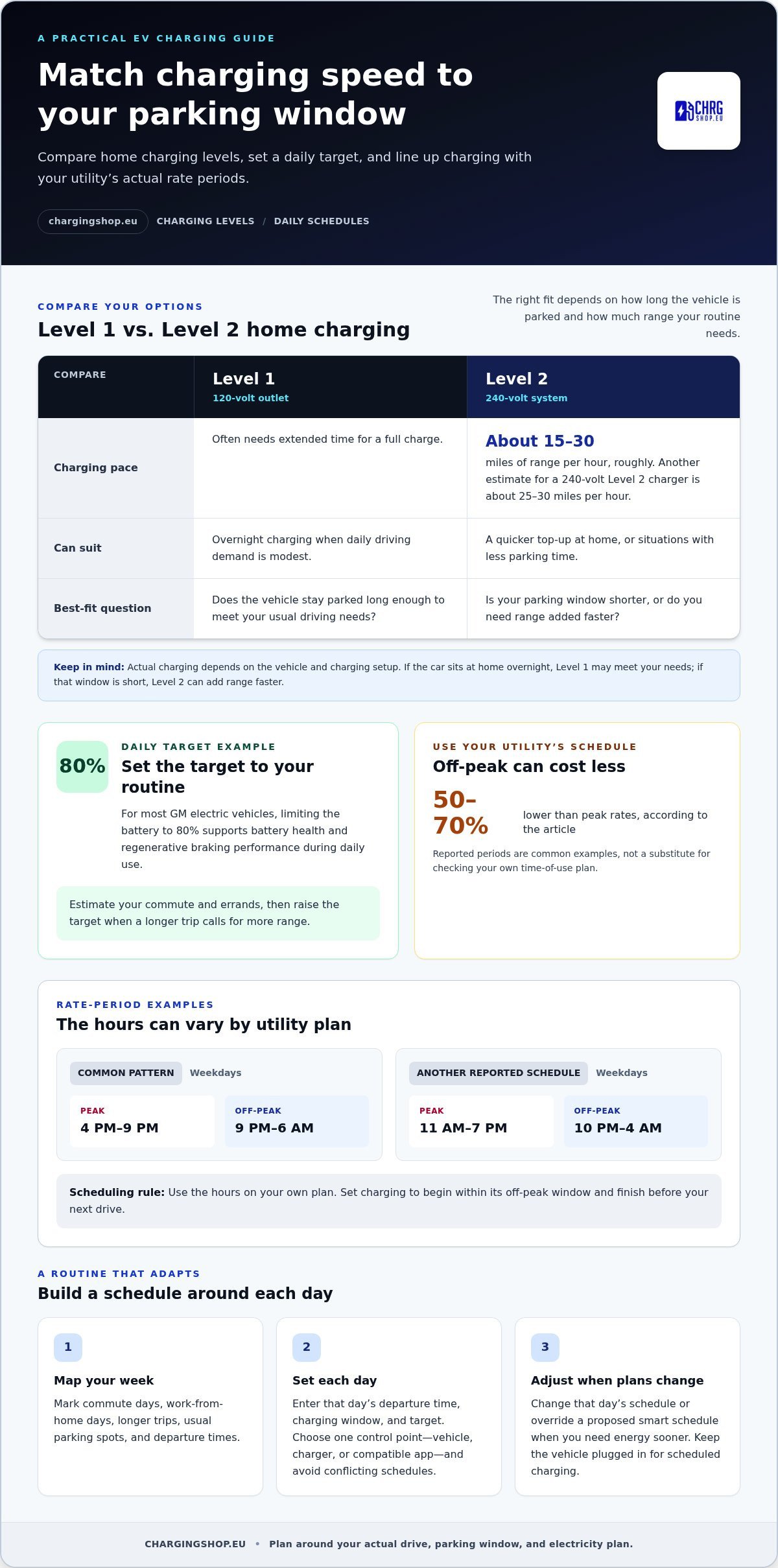
Off-peak hours are often cheapest, commonly 9 PM to 6 AM. Your utility’s time-of-use plan sets the actual window, so check its schedule before setting your vehicle’s charging time.
Check Parking and Electrical Capacity
Check where your vehicle is usually parked and whether there’s a suitable electrical connection nearby. Consider how long it stays parked and whether major appliances use household capacity during that time. A shared driveway, limited outlet access, or high household demand can affect where and when you charge. Choose a reliable parking spot and a charging window that fits your household’s needs. Include your usual departure time in this initial check.
Review Time-of-Use Rates
Compare your utility’s time-of-use periods, not just its headline rate. Off-peak rates can be 50-70% lower than peak rates. Weekday peak hours usually run from 4 PM to 9 PM, while off-peak hours often run from 9 PM to 6 AM. Treat these as common patterns; use your own plan’s hours when scheduling.
Schedule Charging for Off-Peak Periods
Set charging to begin within your utility’s off-peak window and finish before your next drive. This moves demand away from higher-priced periods and can align charging with lower-demand grid conditions. Don’t assume every weekday follows the same pattern: reported schedules include weekday peak rates from 11 AM to 7 PM and an off-peak window from 10 PM to 4 AM. Use the times on your own plan, then adjust your schedule if those periods change.
How does Automatic Smart Charging work?
Automatic smart charging follows settings in your vehicle, charger, or compatible app. It can move charging to your chosen hours instead of starting as soon as you plug in.
- Set a schedule using the charging controls you plan to rely on. Enter your preferred charging window and target charge level, then let the system delay charging until that window. For example, if your utility’s off-peak period starts at night, the schedule can start charging then instead of during peak hours. Creating an EV charging schedule this way means you don’t need to start each session manually. Keep the vehicle plugged in so the schedule can control charging.
- Choose one control point, such as your vehicle’s settings, charger interface, or a compatible smart charging app. Set when charging is allowed and the charge level you want. If both the vehicle and app have schedules, avoid conflicting start times. Review the controls when your routine changes, and update the schedule if your departure time or electricity plan changes. Smart charging manages timing, while you choose settings that suit your driving.
- Check whether your utility offers a smart charging program or enrollment reward. Program rules can affect charging times, so read the terms before enabling automatic control. You can override or skip a proposed schedule when you need energy sooner. Use that option for an unexpected trip, then return to your regular schedule for the next session.
Choosing a target charge level
For most GM electric vehicles, limiting the battery to 80% supports battery health and regenerative braking performance during daily use. Set your target around your usual driving demand, then raise it when a longer trip calls for more range.
- Estimate the range your regular routine requires before setting a target. Consider your commute, errands, and the next time you can charge. A target suited to a typical weekday avoids treating every session like a long-distance departure. For most GM EVs, 80% is a stated daily-use limit. Use the vehicle’s charge controls to set that level, then change it when your planned driving needs more.
- Choose a charging level that fits how long your vehicle stays parked. Level 1 charging uses a standard 120-volt outlet and often needs extended time for a full charge. It can suit overnight charging when daily driving demand is modest. Level 2 charging operates on a 240-volt system and is commonly used at home when drivers need a quicker top-up or have less parking time.
- Compare charging speed with your available parking window. Level 2 charging adds roughly 15-30 miles of range per hour; another estimate for a 240-volt Level 2 charger is about 25-30 miles per hour. Actual charging depends on the vehicle and charging setup. If the car sits at home overnight, Level 1 may meet your needs. If that window is short, Level 2 can add range faster. Set the target in your vehicle or charger controls, and leave enough time before departure.
Setting a different charging schedule for each day
Build your schedule around when you drive, where the vehicle is parked, and when you need it ready. Set a departure time for each day instead of forcing one pattern across the week.
- Map your weekly routine before changing the charging controls. Mark the days you commute, work from home, or take longer trips. For example, set an earlier departure on office days and a later one on days without a commute. Note when the vehicle is usually parked near a charging station. This overview helps you identify practical charging windows instead of relying on one schedule that may not fit every day.
- Set a charging window for each day with a different routine. Enter the departure time first, then choose when charging should start and the target charge level. A weekday commute may need a different setup from a weekend trip. Keep charging within your preferred electricity-rate period when it suits your plans, but prioritize having the vehicle ready to drive. After saving, check the controls and make sure the selected days match your calendar.
- Leave room for changes. If plans shift, adjust that day’s departure time or charging window rather than rebuilding the whole week. Participants can override or skip a proposed smart charging schedule when they need to charge right away. Use that option before an unexpected drive, then return to your saved pattern. If your current setup makes day-by-day planning difficult, explore a Personalised Charging Offer for a charging solution shaped around your needs.
Charging Shop: V2C Trydan 22kW
Charging Shop offers the V2C Trydan 22kW for drivers choosing charging hardware to match their daily routine. A suitable charger depends on your vehicle, available electrical capacity, parking setup, and how long the car usually stays connected. Consider those factors alongside your target charge level and preferred charging times before selecting equipment.
If your requirements call for a different charging solution, Charging Shop also offers the V2C DENKA 20kW DC Wallbox and Alfen Single Pro Line 22kW. A Personalised Charging Offer can help connect your charging needs with an appropriate option. Explore these offerings when your current setup or driving pattern prompts a hardware decision.
Contact Charging Shop or visit chargingshop.eu to explore your charging options.
Make Your Charging Routine Work for You
Treat your schedule as a practical tool, not a fixed rule. If your commute, parking access, or daily plans change, update the settings to keep your vehicle ready without unnecessary charging. Reviewing your routine can show whether your current setup still works or whether different charging hardware would better suit your needs.
Creating an EV charging schedule is one step toward a more deliberate charging routine. Next, match your equipment to how and where you drive. Charging Shop offers EV charging hardware and CHRG Network access for home and business charging needs.
Explore your options or contact Charging Shop for EV charging help. Choose a setup that fits your routine, then keep adjusting your schedule as life changes.
Frequently Asked Questions
How do I create a daily EV charging schedule based on driving needs?
Start with the next day’s driving, then set charging to add the energy you expect to use. A short commute may need only a partial recharge, while errands after work can increase demand. Check your vehicle’s remaining range before changing the target. Keep a separate routine for longer-drive days, and adjust it when your plans change.
How do I set charging schedules in popular EV apps and vehicle settings?
Open the charging controls in your vehicle’s settings or companion app, then look for options such as departure time, charge limit, or preferred charging hours. Menu names vary by vehicle. Save the settings and check that the displayed schedule matches your intended days. If both an app and the vehicle offer controls, use one schedule source to avoid conflicting instructions.
How do I schedule charging with a home EV charger or smart charger?
Use the charger’s controls or connected app to set charging days and allowed hours, then connect the vehicle as usual. If the charger doesn’t have scheduling controls, use the vehicle’s charging settings instead. Avoid running separate timers in both systems unless they’re configured to work together. Make sure the saved schedule reflects when the car is connected and when you need it ready.
How much does home EV charging cost by time of day and utility rate?
Estimate a session’s cost by multiplying the energy added in kilowatt-hours by your rate for that time. Your total depends on the amount of energy added and the applicable rate. Check your bill for the rate periods used to calculate each session.
How do utility time-of-use plans and EV charging programs work in my area?
A time-of-use plan assigns different electricity rates to different periods, while an EV program may coordinate charging with the utility’s schedule. Review the plan’s rate calendar, eligible charging hours, enrollment requirements, and any limits on automatic control. The exact terms depend on your service area and chosen plan. Compare them with your usual parking and departure routine before enrolling.
What charging schedule should I use for road trips or irregular driving?
Plan around the route, departure time, and charging stops rather than following your usual weekday pattern. Set a higher charge target if the trip requires more starting range, then restore your everyday settings afterward. For an unexpected drive, use the vehicle or charger controls to start charging sooner. Recheck the departure plan if your route or stop locations change.
