
 Deutsch
 Dansk
 Suomi
 Latviešu
 Lietuvių
 Norsk bokmål
 polski
 Русский
 Svenska

No products in the cart.
Uncategorized
How to Monitor EV Charging Energy Use and Costs at Home
24
Nov
A charging total is only part of the picture. To learn how to monitor EV charging energy use, download session history from your vehicle or charger account, then compare the energy delivered in kilowatt-hours (kWh) with your electricity rate. This shows your charging activity and gives you a basis for allocating energy costs.
It’s easy to focus on the vehicle’s battery level, but billing depends on the electricity used during charging and when it was used. Keep home and public-station records separate to distinguish household energy use from charging costs elsewhere.
This guide explains where to find charging records, how to track electricity use at home and at stations, and how to calculate and allocate costs. It also covers what session duration and charging times can reveal, so your records are useful for budgeting or billing.
Key Takeaways
- Export charging-session records as a CSV to organize dates, duration, and energy use in one place.
- Allocate charging costs by matching energy consumed with the electricity rate that applied during each session.
- Use home energy and charger data together to distinguish vehicle charging from the rest of your household’s electricity use.
- Track station energy by session to understand utilization and make billing records clearer.
How do I download my charging data?
Open your vehicle or charger app and find the session history or reporting section. If CSV export is available, download the file to sort charging records and calculate costs.
Session History and Tracking
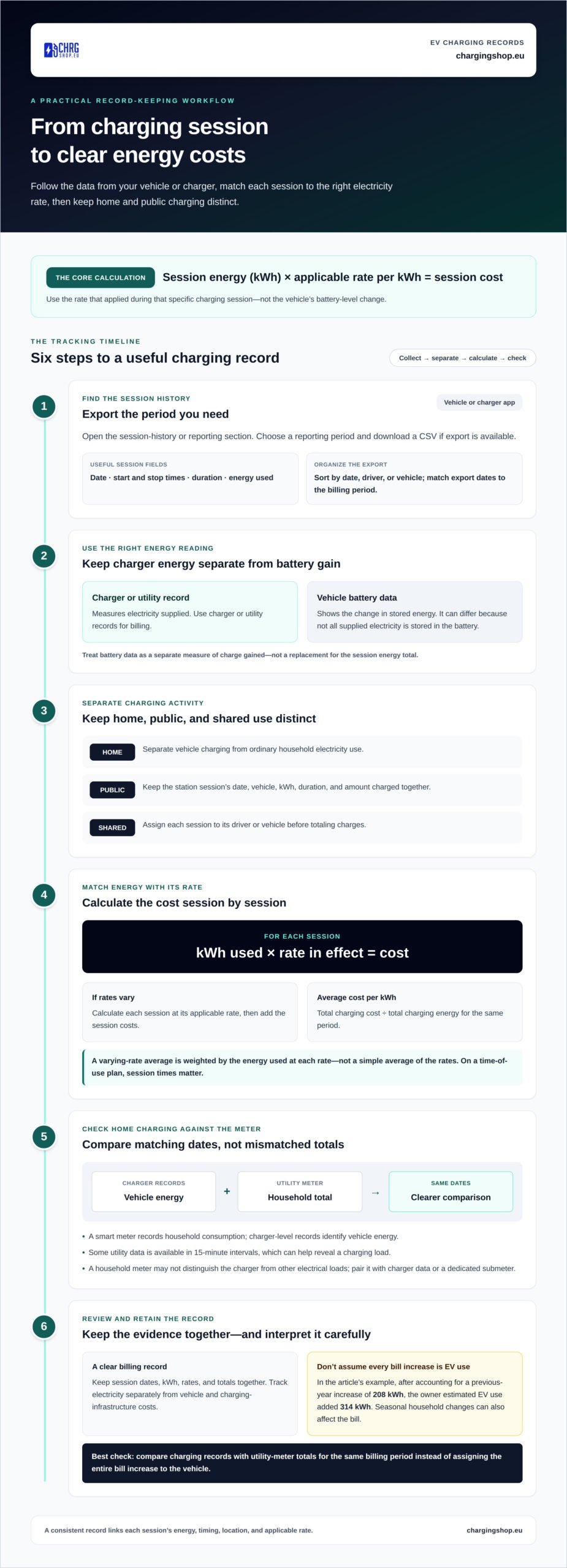
A charging history records sessions, often including dates, start and stop times, and energy used. To learn how to monitor EV charging energy use, choose the reporting period you need and export the records as a CSV spreadsheet. Sort entries by date, driver, or vehicle to distinguish shared-charger use. Match the export dates to your billing period so the records are ready to review.
Energy Delivered and Session Costs
Energy delivered is the electricity recorded for a session, measured in kilowatt-hours (kWh). Multiply that amount by the applicable rate per kWh to calculate cost. With a shared charger, assign each session to its driver or vehicle before totaling charges, so one person’s usage isn’t included in another’s bill.
Charger Readings and Battery Data
Charger readings measure electricity supplied, while vehicle battery data shows the change in stored energy. The values can differ because not all supplied electricity is stored in the battery. Use charger or utility records for billing, and treat battery data as a separate measure of charge gained. This explains why the car’s displayed battery change may not match the session total.
App and Charger Data Fields
Apps and chargers can track session start and stop times, duration, energy use, and history. To calculate cost, multiply session kWh by the rate that applied during charging. To refine how to monitor EV charging energy use, keep each session record with its corresponding rate period. U.S. tax credits and utility rebates depend on program terms and qualifying equipment; monitoring data alone doesn’t establish eligibility.
Energy cost allocation and billing
Allocate charging costs by matching each vehicle’s energy use with the electricity rate in effect during its session. Separate home from public charging, then group shared-charger sessions by driver or vehicle. This gives owners a clearer bill and helps distinguish EV demand from ordinary household use. On a time-of-use plan, session times matter because rates can change throughout the day.
Calculate average cost per kWh by dividing the charging cost by the total charging energy for the same period. If rates vary, calculate each session’s cost separately, then add the costs and divide by the total session kWh. Applying each rate to its corresponding usage produces a weighted average, not a simple average of the rates.
Don’t treat the full electricity-bill increase as the EV’s cost without comparing energy use. After accounting for a previous-year increase of 208 kWh, the owner estimated EV use added 314 kWh. Seasonal household changes can affect the bill too, so compare charging records with utility-meter totals for the same billing period.
For total cost of ownership, track charging separately from other vehicle expenses, then combine the categories in your records. Include electricity used at home and public stations, along with vehicle and charging-infrastructure costs where relevant. This keeps energy costs visible without confusing them with equipment or other expenses. Keep session dates, kWh, rates, and totals together for clear billing.
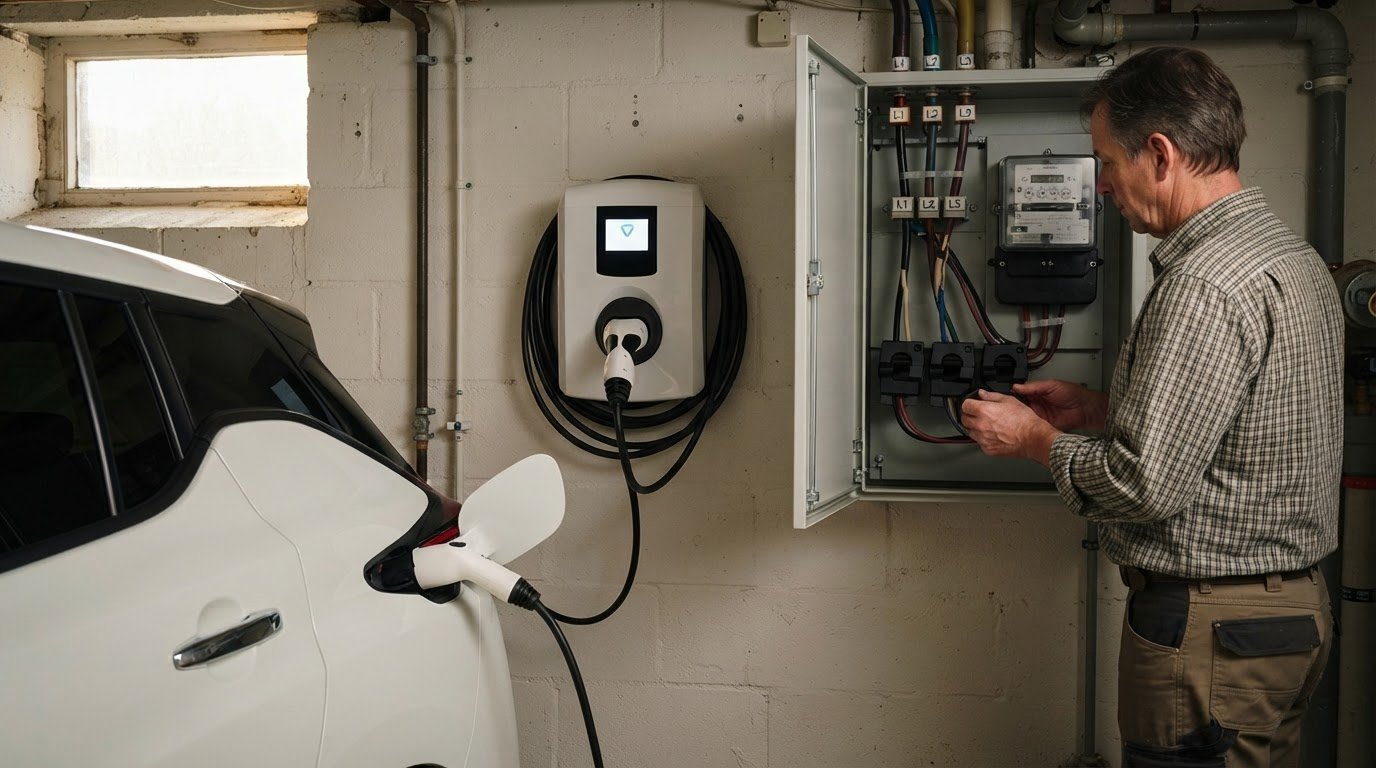
Home charging data and connected smart chargers
Pair charger records with household meter data to see how home charging affects total electricity use. Export matching periods to compare driving and charging patterns.
Home Charger Data Logging
Home charger data logging records energy use over time, helping you distinguish charging activity from the household’s wider electricity demand. Choose an export period that matches the utility bill or the question you’re investigating. A monthly view supports billing comparisons, while shorter periods can reveal when charging starts and stops.
Some utility data is available in 15-minute intervals, which can make a charging load easier to spot. Keep exports from the charger and meter for the same dates; mismatched periods can make totals look inconsistent. A smart meter records household consumption, while charger-level records identify energy used by the vehicle.
Smart Meter and Connected Charger Considerations
A utility smart meter can show household consumption during EV charging, but may not distinguish the charger from other electrical loads. Pair its readings with charger data or a dedicated submeter for clearer attribution. A home energy manager can also show when electricity is cheaper or rooftop solar energy is abundant, helping explain charging patterns.
Connected chargers bring data-access and electrical-monitoring considerations. Limit account access to people who need it, use strong account credentials, and review which users can view charging records. These records can reveal when a driver is home or away, so sharing settings matter. For electrical monitoring, use equipment rated for the charging load. An energy monitor may not be rated for a continuous 10 A draw, so don’t assume every plug-in monitor suits EV charging.
Use consistent periods to make comparisons meaningful. Match charger records to the utility’s billing dates, then compare total household energy use over those same dates. If the utility provides interval readings, check whether charging sessions coincide with increased consumption. This helps identify patterns without assuming every household spike comes from the vehicle.
Monitoring electricity consumption at EV charging stations
Monitor public EV charging by saving each station session’s energy total, duration, and cost from its app or receipt. Compare the recorded kilowatt-hours (kWh) with the price shown for that session, and keep a clear record for each electric vehicle.
At a station, charging software can track current flow and session duration. Energy delivered is measured in kWh, the unit needed for cost allocation. Record the station, session date, vehicle, kWh, and amount charged together. This links each transaction to its energy use instead of relying on a monthly bank statement alone.
For a consistent record, export or save the charging provider’s session history after charging. Keep each station session as a separate entry, especially when drivers use different vehicles or accounts. Add the session’s energy and cost to your records, then group entries by vehicle or driver for billing. This also makes missing sessions or unusual totals easier to spot.
For station owners and fleet managers, submetering most clearly separates EV charging from other electrical loads. According to ENERGY STAR, submetering EV charging energy is the most accurate method of accounting for it. Charger monitoring software adds context by recording current flow and session duration, while a submeter identifies the electricity used by charging equipment.
Utilization matters when electricity rates vary by time of use. Track when sessions occur and compare them with the rate periods in your electricity agreement. If most charging happens during lower-rate periods, station use is aligned with the tariff. If sessions cluster during higher-rate periods, review charging schedules. Keep energy, duration, cost, and timing together for every public session to support clearer billing and operating decisions.
For fleet managers with time-of-use electricity agreements, tracking charger utilization helps check whether most charging takes place when rates are low. One participant estimated EV energy use at 3 miles per kWh and said charging losses were 10-15%, so account for losses when interpreting delivered energy.
Charging Shop
Charging Shop helps you match home charging requirements with suitable EV charging hardware. Review your setup when your energy records point to a change, or when planning a new home or business charging point. A Personalised Charging Offer can help match your requirements with available options, while keeping equipment selection distinct from energy-billing calculations.
Charging Shop’s curated selection includes the V2C DENKA 20kW DC Wallbox and Abb terra ac for various charging environments. Compare your usage patterns, charging location, and power requirements when deciding which hardware to explore. Your session records remain the basis for monitoring energy and allocating costs; the charger choice should fit the way you plan to charge.
Contact Charging Shop to discuss your charging requirements and available options.
Make Your Next Charging Decision Count
Let your records guide your next decision. As your driving routines or charging locations change, revisit how you monitor EV charging energy use over time. Consistent records make changes easier to interpret and help you decide whether your current setup still fits.
Think beyond the next bill. Consider who needs access to charging information, how you’ll separate household and vehicle use, and which charging patterns matter most. These priorities can guide an informed equipment discussion without confusing hardware choices with energy-cost calculations.
Charging Shop offers options including the V2C Trydan 22kW, V2C DENKA 20kW DC Wallbox, and Alfen Single Pro Line 22kW. If you’re ready to discuss your charging requirements, contact Charging Shop. Take the next step with a clear view of what you need from your charging setup.
Frequently Asked Questions
Why is the cost of the session not what I expected?
A session total may differ from your estimate if the rate changed during charging or you used the wrong tariff period. Check the session’s start and end times against your electricity plan, then compare the billed energy with the charger record. For a public session, review the station receipt for separate transaction or parking charges before treating the total as electricity-only cost.
How can I monitor energy use from an EV charger?
Use charger session records to review energy consumption, and pair them with utility data for a wider household view. For a shared charger, label each record by vehicle or driver so individual use remains distinct. You can also note the charging location and whether a session was at home or public, making it easier to compare patterns without mixing separate accounts.
Which home EV energy monitors and smart chargers are best?
The best fit depends on whether you need household-wide readings, charger-level session records, or equipment for a particular charging setup. Charging Shop offers the V2C Trydan 22kW, V2C DENKA 20kW DC Wallbox, and Alfen Single Pro Line 22kW. For tailored equipment selection, its Personalised Charging Offer can help connect your requirements with available charging options.
